Showing posts with label PyObjC. Show all posts

Sunday, April 22, 2012

PyObjC Templates for Xcode are back!

I came across a page from a guy who went to the trouble of making and posting new templates for using PyObjC with Xcode 4.

Thanks!

They are on github here. I just followed the instructions:

Copy the File Templates and Project Templates folders to the following path in your home directory, creating any missing intermediate directories if needed:

~/Library/Developer/Xcode/Templates/

I'm a little rusty with Xcode (and it's become more and more like flying the space shuttle or something. Still, I was able to recycle this old project, while changing it just a bit.


One funny thing, I couldn't figure out how to hook up the text field outlet in the old way. I had to use bindings, and of course I did so for the popup as well (both Content and Selected Index).

I don't have a lot of time to fool with Xcode any more, but I do want to check out Greg's blog. Thanks again.

Here's the AppDelegate:

#-*- coding: utf-8 -*-

from Foundation import *
from AppKit import *

class SpeakerAppDelegate(NSObject):
    TF = objc.ivar('TF')
    voiceL = objc.ivar('voiceL')
    nameL = objc.ivar('nameL')
    selectedIndex = objc.ivar('selectedIndex')
    notSpeaking =  objc.ivar('notSpeaking')
    pretext = 'Hi, my name is '
    
    def init(self):
        s = NSSpeechSynthesizer.alloc().initWithVoice_(None)
        self.speaker = s
        self.speaker.setDelegate_(self)
        self.setVoices()
        self.notSpeaking = True
        self.setSelectedIndex_(0)
        return self
    
    def setTF_(self, value):
        if value != self.TF:
            self.TF = value

    def setSelectedIndex_(self, value):
        if value != self.selectedIndex:
            self.selectedIndex = value
        name = self.nameL[self.selectedIndex]
        self.setTF_(self.pretext + name)

    def setVoices(self):
        L = NSSpeechSynthesizer.availableVoices()
        self.voiceL = L
        DL = [NSSpeechSynthesizer.attributesForVoice_(v) for v in L]
        nL = [D.objectForKey_('VoiceName') for D in DL]
        self.nameL = NSMutableArray.arrayWithArray_(nL)
        NSLog("%s" % self.nameL)
    
    @objc.IBAction
    def speak_(self,sender):
        i = self.selectedIndex
        NSLog("%i Say:  %s" % (i, self.TF))
        self.speaker.setVoice_(self.voiceL[i])
        self.notSpeaking = False
        self.speaker.startSpeakingString_(self.TF)
        pass
    
    def speechSynthesizer_didFinishSpeaking_(self,speechSyn,flag):
        NSLog("didFinishSpeaking_")
        self.notSpeaking = flag

Sunday, March 13, 2011

Cocoa: where to start?

Recommended resources for beginning Cocoa with Objective-C
NSOrderedDescending

  • do the temperature converter in the Cocoa Application Tutorial
  • short articles at Cocoa Dev (here much more here; C review)
  • Aaron Hillegass's book
  • Cocoa Fundamentals Guide (here)

    Specific to PyObjC:

  • Will Larson's tutorials (here here here here here)
  • Apple's page including a version of the temperature converter
  • Read the official introduction carefully (my biggest problem)

    A page of links to old material with simple demos of specific Cocoa features that mostly still work here.

    Code a simple game like TicTacToe, Fifteen, or Color Sudoku.

    After that, I've got tons of projects here and here. Get started with bindings (here), then move on to Vlad the Impaler (here).

    Learn specific topics by reading the Apple docs (slowly and repeatedly, it can take a while to get it, by building a simple demo project that does only that one thing. Like NSPredicate which we've done in six posts (here here here here here & one to come).

    And if you want the PyObjC templates for Xcode see here.
  • NSPredicate: PyObjC version

    Here is the answer in the previous post, converted to PyObjC. It's a bit simpler, except that some of the methods require a "real" NSArray or NSString.


    from Foundation import *
    import objc

    class NSString(objc.Category(NSString)):
    def validate(self):
    A = self.UTF8String().split(':')
    fm = NSFileManager.defaultManager()
    def f(s):
    print 'test', s
    home = NSHomeDirectory()
    s = s.replace('~',home)
    return fm.fileExistsAtPath_(s)
    return all([f(s) for s in A])

    s = NSString.stringWithString_('~/Desktop')
    print s.validate()

    for s in ['~:~/Desktop','xyz']:
    s = NSString.stringWithString_(s)
    f = NSExpression.expressionForConstantValue_(s)
    e = NSExpression.expressionForFunction_selectorName_arguments_(
    f,'validate',None)
    results = e.expressionValueWithObject_context_(None,None)
    print results
    print

    p = NSPredicate.predicateWithFormat_(
    "FUNCTION(SELF, 'validate') isEqual:YES")
    A = ['~/Desktop','xyz']
    A = [NSString.stringWithString_(s) for s in A]
    A = NSArray.arrayWithArray_(A)
    for item in A.filteredArrayUsingPredicate_(p):
    print item

    print p.evaluateWithObject_(NSString.stringWithString_('~/Desktop'))


    output:


    test ~/Desktop
    True
    test ~
    test ~/Desktop
    True
    test xyz
    False

    test ~/Desktop
    test xyz
    ~/Desktop
    test ~/Desktop
    True

    Tuesday, March 1, 2011

    TV with bindings in PyObjC


    This post is a "note to myself" reminding me of how to do a very simple NSTableView with bindings in PyObjC.

    There is a window in the xib file holding a Table View and two buttons, and an Array Controller as well. The buttons are hooked up to actions in the AppDelegate. The window of the app looks like the screenshot above. Here's the IB window with the objects on it:


    The bindings are set up like this. The first one is for the left-hand Table Column. The second is for the App Controller.


    One thing I always forget is whether you need self in the Model Key Path for the App Controller (you don't).

    The code is below. The second thing I have trouble with is remembering to do the objc.ivar thing, and to have a method like setL_. Without those, the App Controller can read the values, but it can't write them to the model, and it won't know if the model is updated programmatically.


    from Foundation import *
    from AppKit import *
    import objc

    class TV_bindingsAppDelegate(NSObject):
    L = objc.ivar("L")

    def init(self):
    self.L = [ {'x':'x1', 'y':'y1'},
    {'x':'x2', 'y':'y2'} ]
    return self

    def setL_(self, value):
    if value != self.L:
    self.L = value

    @objc.IBAction
    def report_(self, sender):
    print 'report'
    for D in self.L:
    for k in sorted(D.keys()):
    print k, D[k],
    print

    @objc.IBAction
    def reprogram_(self, sender):
    L = self.L[:]
    s = str(len(L)+1)
    L.append({'x':'x'+s,'y':'y'+s})
    self.setL_(L)

    Thursday, February 17, 2011

    Fifteen


    I've put up the files for the Fifteen puzzle I posted about the other day (here). This is an Xcode project (and includes a copy of the built application). It's on Dropbox (here).

    You can move tiles by clicking with the mouse or using the arrow keys (much faster).

    I have not solved the technical problem of eliminating unsolvable puzzles, but I've played a few times and have yet to run into one. Either my expectations are wrong or I'm just lucky. I'll try to work more on this some other time.

    Saturday, January 29, 2011

    Distributed Objects on OS X (2)

    I struggled for a while to get Distributed Objects working between different machines (first post here for same-machine example). According to the docs and this, you should just use


    NSSocketPortNameServer *name_server;
    name_server = [NSSocketPortNameServer sharedInstance];
    NSLog(@"%@", [name_server description]);
    BOOL result;
    result = [conn registerName:@"my_server"
    withNameServer:name_server];


    But it didn't work for me. So I asked a question on SO (here), and asked the Google. The latter approach finally worked. I got a working example with code from here. The discussion in the docs for the NSConnection class helped too (see initWithReceivePort:sendPort:. If you set it up with nil for the sendPort, it uses the same port for both sending and receiving, which is what you want.)

    [UPDATE: On reflection, it does seem a bit weird, because a Mach port is supposed to be a one-way channel, yet these are clearly two way. I guess they are probably complex objects built from multiple NSMacPorts. ]

    Server:


    // gcc talk3.m -o test -framework Foundation
    // http://web.archiveorange.com/archive/v/SEb6a6s543xreqfXtOCQ
    #import <Foundation/Foundation.h>

    @interface VendedObject:NSObject {}
    -(NSString *) speak;
    @end

    @implementation VendedObject

    -(NSString *) speak {
    return @"woof";
    }
    @end

    @interface NSConnection (NetworkServiceAdditions)

    + (id) networkServiceConnectionWithName:(NSString *) inName
    rootObject:(id) inRootObject;

    @end

    @implementation NSConnection (NetworkServiceAdditions)

    + (id) networkServiceConnectionWithName:(NSString *) inName
    rootObject:(id) inRootObject;
    {
    NSSocketPort *port = [[[NSSocketPort alloc] init] autorelease];
    NSConnection *connection = [NSConnection connectionWithReceivePort: port
    sendPort: nil];

    [[NSSocketPortNameServer sharedInstance] registerPort:port
    name:inName];
    [connection setRootObject: inRootObject];
    return connection;
    }

    @end

    int main(){
    NSAutoreleasePool *pool;
    pool = [[NSAutoreleasePool alloc] init];
    VendedObject *obj;
    obj = [[[VendedObject alloc ] init] autorelease];
    NSLog(@"%@", [obj description]);
    NSConnection *conn;
    conn = [NSConnection networkServiceConnectionWithName:@"my_server"
    rootObject:obj ];
    NSSocketPortNameServer *name_server;
    name_server = [NSSocketPortNameServer sharedInstance];
    NSLog(@"%@", [name_server description]);
    NSLog(@"%@", [name_server portForName:@"my_server"]);
    [[NSRunLoop mainRunLoop] run];
    [pool drain];
    return 0;
    }


    Note: if you're not just killing the Server (as I did) you should do invalidate on the connection (and I guess the ports too?).

    Client listen.py is on my laptop:


    from Foundation import *

    proxy_obj = NSConnection.rootProxyForConnectionWithRegisteredName_host_usingNameServer_(
    "my_server", "osxserver.local", NSSocketPortNameServer.sharedInstance())

    if not proxy_obj:
    print 'Did not get an object from the server.'
    else:
    print proxy_obj.description()
    print type(proxy_obj)
    print proxy_obj.speak()


    Output:


    > python listen.py 
    <VendedObject: 0x10010ced0>
    <objective-c class NSDistantObject at 0x7fff70a64868>
    woof


    It works!

    NSTask again

    I have a bit more to explore about NSTask (previous post here). There is some discussion on SO about the difference between an NSTask and an NSThread (here).

    The script task.py uses the #! thing and is set to be executable (by the user only). The code looks for an int in argv and a second arg that tells whether to examine the environment variable dictionary.


    #! /usr/bin/python
    import sys, os

    try:
    n = int(sys.argv[1])
    except:
    n = 2
    print 'woof ' * n
    if len(sys.argv) == 3:
    D = os.environ
    k = 'MYKEY'
    if k in D: print k, D[k]
    else: print k, 'not present'


    The first attempt just launches the task without setting it up first.

    The second example does the setup. The path p2 (to Python directly) isn't used in these versions but I left it in. For a while, I was getting errors when I tried to setup the task and then launch it unless I fed it to Python first and gave the script path as an argument. Then, the errors just stopped. I can't recreate the problem. This kind of bug that "just disappeared" happened with the environment dictionary as well. No clue as to why.


    from Foundation import *

    p1 = NSHomeDirectory() + '/Desktop/task.py'
    p2 = '/usr/bin/python'

    def f1():
    t = NSTask.launchedTaskWithLaunchPath_arguments_(
    p1, [str(1)])

    def doit(t):
    t.launch()
    t.waitUntilExit()

    def f2():
    t = NSTask.alloc().init()
    t.setLaunchPath_(p1)
    doit(t)

    f1()
    f2()


    Of note here is that the arguments must be in a list or array, and that the int argment must be converted to a string. The error if not is weird (but at least we're pointed to the correct line):


    2011-01-29 03:18:00.109 Python[19298:60f] -[OC_PythonNumber fileSystemRepresentation]: unrecognized selector sent to instance 0x101a6d950
    Traceback (most recent call last):
    File "parent.py", line 48, in <module>
    f()
    File "parent.py", line 15, in f1
    p1, [1])
    ValueError: NSInvalidArgumentException - -[OC_PythonNumber fileSystemRepresentation]: unrecognized selector sent to instance 0x101a6d950


    Otherwise we get this:


    > python parent.py 
    woof
    woof woof


    Next, we instantiate the task and then set its arguments and environment, having modified the dict to have an extra key/value pair:


    D = NSProcessInfo.processInfo().environment()
    D['MYKEY'] = "MYVALUE"

    def f3():
    t = NSTask.alloc().init()
    t.setLaunchPath_(p2)
    n = str(3)
    t.setArguments_([p1,n,'withenviron'])
    t.setEnvironment_(D)
    print 'MYKEY', t.environment()['MYKEY']
    doit(t)

    f3()


    > python parent.py 
    MYKEY MYVALUE
    woof woof woof
    MYKEY MYVALUE


    The ultimate line of output is from the task and shows that we did get the modified environment.

    And in the last example, we use an NSFileHandle and redirect standard output. This could be useful in the case where you don't have full control over the task that is being executed. I found that NSFileHandle.fileHandleForWritingAtPath_ apparently requires the file to already exist.


    p3 = NSHomeDirectory() + '/Desktop/results.txt'

    def f4():
    t = NSTask.alloc().init()
    t.setLaunchPath_(p1)
    n = NSNumber.numberWithInt_(4).stringValue()
    t.setArguments_([n])
    # file must exist or this fails!
    f = NSFileHandle.fileHandleForWritingAtPath_(p3)
    t.setStandardOutput_(f)
    doit()
    data = f.readToEndOfFileInBackgroundAndNotify()
    print data

    f4()


    > python parent.py 
    None
    > cat results.txt
    woof woof woof woof


    The redirect is good, but I couldn't get the file read to work. I tried before and after launch, and I tried re-grabbing the file handle, and I also tried readDataToEndOfFile. Not sure what's up with that yet.

    [UPDATE: Perhaps the answer has something to do with NSPipe (here). ]

    Thursday, January 27, 2011

    Distributed Objects on OS X

    I got a simple example with Distributed Objects working. This is supposed to be the standard way to communicate between processes. I tried it first with both the Server and the Client in PyObjC. Eventually I rewrote the Server in Objective-C and then it worked.

    [UPDATE: Found a great working example (old, but from an Apple engineer here). ]

    The output is:


    > python listen.py 
    <VendedObject: 0x10010cce0>
    <objective-c class NSDistantObject at 0x7fff70a64868>
    woof


    I'm not sure what the problem was but the error I got was


    [OC_PythonString initWithBytes:length:encoding:]: unrecognized selector sent to instance 0x3635130


    Server:


    // gcc talk.m -o test -framework Foundation
    #import <Foundation/Foundation.h>

    @interface VendedObject:NSObject {}
    -(NSString *) speak;
    @end

    @implementation VendedObject

    -(NSString *) speak {
    return @"woof";
    }
    @end

    int main(){
    NSAutoreleasePool *pool;
    pool = [[NSAutoreleasePool alloc] init];
    VendedObject *obj;
    obj = [[[VendedObject alloc ] init] autorelease];
    NSLog(@"%@", [obj description]);

    NSConnection *conn;
    conn = [[[NSConnection alloc] init] autorelease];
    [conn setRootObject:obj];
    BOOL result;
    result = [conn registerName:@"my_server"];
    if (!result) {
    NSLog(@"Failed to register Name");
    }
    else {
    NSLog(@"%@", [conn description]);
    }
    [[NSRunLoop mainRunLoop] run];
    [pool drain];
    return 0;
    }


    Run with:


    > ./test
    2011-01-27 12:09:39.001 test[36995:903] <VendedObject: 0x10010cce0>
    2011-01-27 12:09:39.005 test[36995:903] (** NSConnection 0x100112050 receivePort <NSMachPort: 0x100112530> sendPort <NSMachPort: 0x100112530> refCount 1 **)


    You'll have to kill the process when you're done. If you have tried once already in Terminal, you will need to Quit Terminal and Re-launch. Otherwise registerName: will fail.

    Client:


    from Foundation import *

    proxy_obj = NSConnection.rootProxyForConnectionWithRegisteredName_host_(
    #"my_server", "osxserver.local")
    "my_server", None)
    if not proxy_obj:
    print 'Did not get an object from the server.'
    else:
    print proxy_obj.description()
    print type(proxy_obj)
    print proxy_obj.speak()


    I also tried to connect to another machine on my local network, but I couldn't get that to work either. The proxy_obj was nil/None.

    Wednesday, January 26, 2011

    NSNotifications

    I want to send information between two running applications and I mistakenly thought I could use an NSNotification to do this. [See the UPDATE].

    So this post is about the first step, getting an NSNotification to work within a running app. The following is from an Xcode Cocoa-Python app, and in AppDelegate.py we have:


    from Foundation import *
    from AppKit import *
    import objc

    class SpeakAppDelegate(NSObject):
    def applicationDidFinishLaunching_(self, sender):
    NSLog("Application really did finish launching.")
    nc = NSNotificationCenter.defaultCenter()
    nc.addObserver_selector_name_object_(
    self, "mycallback:", 'love_note', None)

    @objc.signature('v@0:@8')
    def mycallback_(self,note):
    print 'note'
    print note.description()

    @objc.IBAction
    def button_(self,sender):
    print sender, 'button'
    nc = NSNotificationCenter.defaultCenter()
    nc.postNotificationName_object_userInfo_(
    'love_note', None, {'path':'xyz'})


    There's a button in the window hooked up to the IBAction. I push the button and get:


    <NSButton: 0x61c7b0> button
    note
    NSConcreteNotification 0x6337a0 {name = love_note; userInfo = {
    path = xyz;
    }}


    But I couldn't get it to work between apps, for example with this one compiled in Terminal:


    // gcc tell.m -o test -framework Foundation
    #import <Foundation/Foundation.h>

    int main() {
    NSNotificationCenter *nc;
    nc = [NSNotificationCenter defaultCenter];
    [nc postNotificationName:@"love_note"
    object:nil
    userInfo:nil ];
    return 0;
    }


    I asked on Stack Overflow (here), and they say I should be using Distributed Objects (here). So I have to look into that.

    [ UPDATE: Just substitute NSDistributedNotificationCenter in the code above. It works! ]

    Wednesday, January 19, 2011

    NSCountedSet

    I just got a helpful comment on an old post (here) suggesting the use of an NSCountedSet. I'd never heard of this class, but it's described in the Apple docs about Collections (here). Besides the usual characters

    NSArray
    NSMutableArray
    NSDictionary
    NSMutableDictionary
    NSIndexSet

    there are several others including:

    NSPointerArray
    NSPointerFunctions
    NSMapTable
    NSHashTable
    NSCountedSet

    Let's show off the last one, from PyObjC. Here's the listing:

    from Foundation import *

    L = list('xyyzzz')
    S = NSCountedSet.alloc().initWithArray_(L)

    def show(S):
    e = S.objectEnumerator()
    while True:
    obj = e.nextObject()
    if not obj: break
    print obj, S.countForObject_(obj)
    print

    show(S)
    N = S.countForObject_('z')
    for i in range(N):
    S.removeObject_('z')
    print 'z', S.countForObject_('z')
    print 'w', S.countForObject_('w')

    and the output:

    x 1
    y 2
    z 3

    z 2
    z 1
    z 0
    w 0

    It feels a bit strange, not only can you get the count of an object that's not in the set (as in Python), but as the docs say:
    removeObject: does nothing if anObject is not present in the set

    Thursday, January 13, 2011

    Finding Python (for PyObjC) 3


    Just a short post to say that I asked about this on Stack Overflow and got a very nice answer from Ned Deily (here). He explains clearly what the different "executables" are about, and reminds me of a tool I'd overlooked: otool. For example


    > otool -L /System/Library/Frameworks/Python.framework/Versions/2.6/Resources/Python.app/Contents/MacOS/Python
    /System/Library/Frameworks/Python.framework/Versions/2.6/Resources/Python.app/Contents/MacOS/Python:
    /System/Library/Frameworks/Python.framework/Versions/2.6/Python (compatibility version 2.6.0, current version 2.6.1)
    /usr/lib/libSystem.B.dylib (compatibility version 1.0.0, current version 125.2.0)


    Although it is not so helpful here:


    > otool -L /System/Library/Frameworks/Python.framework/Versions/2.6/bin/python
    /System/Library/Frameworks/Python.framework/Versions/2.6/bin/python:
    /usr/lib/libSystem.B.dylib (compatibility version 1.0.0, current version 125.2.0)


    I still think the export DYLD_PRINT_LIBRARIES=1 trick is pretty cool.

    You can also look into nm (like here).

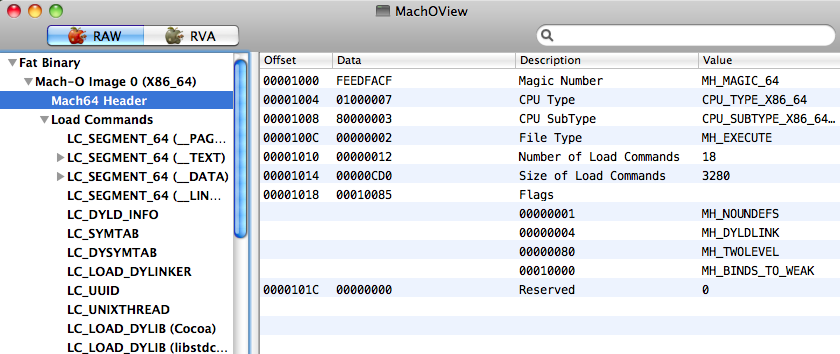
    I found MachOView.app at Source Forge (here) and tried it. It gave me quite a bit of insight into the structure of our simple examples from the other day (here). The screenshot above is from a run on its own executable. There is very detailed info on the object code (or images in geek-speak).

    I had been a bit worried about it since I can't find out anything about the guy (Peter Saghelyi). But I found the source, which is not under files. Do:


    svn co https://machoview.svn.sourceforge.net/svnroot/machoview machoview

    Sunday, January 9, 2011

    Python for PyObjC

    This is a short post to document that I was able to download the Python.org's Framework build of Python 2.7 and then install matplotlib in it, as well as modify a Cocoa-Python application to link against that Framework. The only thing that looks a little shaky is the PyObjC install, but it still seems like it's working. Not every detail is given, but I hope it's enough.

    The installer comes from here for python-2.7.1-macosx10.6.dmg (Mac Installer disk image (2.7.1) for OS X 10.6 and later).

    I did a stock install except I unchecked Shell profile updater under Custom.. Not sure why, except I didn't want to spend time figuring out what it does.

    Python.org installs stuff in


    /Library/Frameworks/Pythonframework
    /Applications
    /usr/local/bin


    I added this to .bash_profile


    > export PATH=/$PATH:/Library/Frameworks/Python.framework/Versions/2.7/bin


    I anticipated that easy_install would be difficult, but I got (something like) it from distribute:


    > curl -O http://python-distribute.org/distribute_setup.py
    > /usr/local/bin/python distribute_setup.py


    I couldn't find any decent docs, though. It looks like they've just copied the easy_install documentation which I found impossible to figure out so far. But, poking around, I found easy_install and easy_install-2.7 in bin:


    > which easy_install-2.7
    /Library/Frameworks/Python.framework/Versions/2.7/bin/easy_install-2.7


    The way my $PATH is set up, easy_install runs the wrong Python. That's OK, we just do:


    > easy_install-2.7 -U numpy
    > easy_install-2.7 pyobjc==2.2
    > easy_install-2.7 -U pip


    pyobjc has lots of warnings but looks OK


    > /usr/local/bin/python 
    Python 2.7.1 (r271:86882M, Nov 30 2010, 10:35:34)
    [GCC 4.2.1 (Apple Inc. build 5664)] on darwin
    Type "help", "copyright", "credits" or "license" for more information.
    >>> import numpy
    >>> numpy.__version__
    '1.5.1'
    >>> import objc
    >>> objc.__version__
    '2.2'
    >>> from Foundation import *
    >>>
    [1]+ Stopped /usr/local/bin/python


    Next, I installed matplotlib using instructions from Gavin Huttley (here, here). Since matplotlib-1.0.0 is available, I went for it. In the make.osx file:


    PYVERSION=2.7
    PYTHON=python${PYVERSION}
    ZLIBVERSION=1.2.3
    PNGVERSION=1.2.39
    FREETYPEVERSION=2.3.11
    MACOSX_DEPLOYMENT_TARGET=10.6
    OSX_SDK_VER=10.6
    ARCH_FLAGS="-arch i386-arch x86_64"


    I changed it to Python 2.7.

    I also needed to update to libpng-1.2.39 and libfreetype-2.3.11 (although these are not the latest versions.. In fact, I had a bit of trouble with libpng since I got back a file that was really html, though titled as .gz or .bz2 or .xz. I finally found it here). For the other one:


    > FREETYPEVERSION=2.3.11
    > curl -O http://ftp.twaren.net/Unix/NonGNU/freetype/freetype-{$FREETYPEVERSION}.tar.bz2


    As I said, the build instructions were as given at the link.

    [UPDATE: Poking around in libpng file INSTALL, I notice that it says: "Before installing libpng, you must first install zlib, if it is not already on your system." So I'll do it in that order next time.]

    I tested matplotlib by running the script from here.

    Then, I got PyCogent (download link):


    > cd PyCogent-1.5
    > /usr/local/bin/python setup.py build
    > sudo /usr/local/bin/python setup.py install
    >>> from cogent import *
    >>>
    [2]+ Stopped /usr/local/bin/python


    > cd tests
    > /usr/local/bin/python alltests.py "$@"


    I had a few failures:


    Ran 3602 tests in 184.766s

    FAILED (failures=12, errors=4)


    Some of these are related to executables not present. Looks pretty good. Finally, let's setup a new Xcode project:

    Xcode > Cocoa-Python application

    change SDK to 10.6
    delete Python.framework
    drag in new Python.framework
    under Targets > X > Link Binary ..
    drag in new Python.framework


    Since our Python is a universal binary with 64-bit:


    > /usr/local/bin/python
    Python 2.7.1 (r271:86882M, Nov 30 2010, 10:35:34)
    [GCC 4.2.1 (Apple Inc. build 5664)] on darwin
    Type "help", "copyright", "credits" or "license" for more information.
    >>> import sys; print hex(sys.maxint)
    0x7fffffffffffffff
    [2]+ Stopped /usr/local/bin/python
    > /usr/local/bin/python -c "import struct; print struct.calcsize('P')"
    8
    > /usr/local/bin/python -c "import platform; print platform.architecture()"
    ('64bit', '')


    Build the Xcode project as 64-bit as well. Add this to main.py:


    import sys
    print sys.version
    print hex(sys.maxint)


    And run it from the Console:


    2.7.1 (r271:86882M, Nov 30 2010, 10:35:34) 
    [GCC 4.2.1 (Apple Inc. build 5664)]
    0x7fffffffffffffff

    It works!

    Saturday, January 8, 2011

    Finding Python (for PyObjC) 2

    One last post about PyObjC issues and finding which Python is running (under OS X) and then I'm done with it. Until I have another problem.. The structure of a framework is like this:


    MyFramework.framework/
    MyFramework -> Versions/Current/MyFramework
    Resources -> Versions/Current/Resources
    Versions/
    A/
    MyFramework
    Headers/
    MyHeader.h
    Resources/
    English.lproj/
    InfoPlist.strings
    Info.plist
    Current -> A

    From the docs, a framework normally has a structure like that shown above, where (if A is the current version) the actual library would be:

    MyFramework.framework/Versions/A/MyFramework

    The reason for the post is that I realized I've been overlooking something obvious: the existence of an Info.plist file. Just as we set the key: NSPrincipalClass, to have the value: SimpleMessage in our bundle (here), there is a key in the Python.framework:

    cat Resources/Info.plist
    ..
    <key>CFBundleExecutable</key>
    <string>Python</string>

    This key is not required to be set for a framework (a framework doesn't have to contain any code), but if it is, you'd expect it to be the path to the executable. Although there is something in the Framework docs about this key must be the same as the name of the framework. So the executable should be:

    /System/Library/Frameworks/Python.framework/Versions/2.5/Python

    As far as I can see, our best approach is still to snoop on the loader. And to solve the original problem (no PyObjC) by making sure that we're running System Python.

    Friday, January 7, 2011

    Finding Python (for PyObjC)

    This is a post exploring how to hunt down which Python is launched when we build and run a Python Cocoa application using Xcode and the templates from here.

    The problem to be solved is that in some situations, the wrong Python is run, and it doesn't have PyObjC installed, so the statement import objc fails with ImportError, and the App terminates.

    In order to fix that, we need to figure out which Python is running and either (i) change which one is run, (ii) remove the "wrong" one, (iii) install PyObjC into the "wrong" one or (iv) provide a path to PyObjC. I fixed my problem before by (ii). I never got (iii) working because I haven't figured out yet how to install easy_install when it's not there yet, or alternatively build PyObjC from scratch.

    What we'll see here leads to the recommendation that you try (i).

    We can start our troubleshooting by inserting this code into main.py before the import of objc, as shown:

    import sys
    print sys.version
    import objc


    2.5.4 (r254:67916, Jun 24 2010, 21:47:25) 

    Where does this come from? To begin with, it does not depend on this line in main.m:

    Py_SetProgramName("/usr/bin/python");

    The line can be commented out and everything still runs fine. I think it may be roadkill left over from the old days.

    The second thing is that if we look at the Xcode build settings for either the project or the target we see:

    Base SDK Mac OS X 10.5

    The name or path of the base SDK being used during the build. The product will be built against the headers and libraries located inside the indicated SDK. This path will be prepended to all search paths, and will be passed through the environment to the compiler and linker. Normally, this path is set at the project level via the "Cross-Develop Using Target SDK" popup in the General tab of the project inspector. Additional SDKs can be specified in the ADDITIONAL_SDKS setting. [SDKROOT]


    Since the default SDK was set for 10.5, at link time we expect to link against:

    /Developer/SDKs/MacOSX10.5.sdk/System/Library/Frameworks/Python.framework

    If we double-click on the Python.framework (under Frameworks > Linked Frameworks in the Xcode project) we get a Finder window open to:

    /System/Library/Frameworks/Python.framework

    If we do get info with the Python.framework selected we get

    Name: Python.framework
    Path: /System/Library/Frameworks/Python.framework


    but all of this says nothing about the version so one might expect it to go with Current, which is actually Python 2.6:

    /System/Library/Frameworks/Python.framework/Versions/2.6

    I've looked at environment info. Put this in main.py:

    import os
    for k in os.environ:
    print k, os.environ[k]

    The only thing interesting is:

    PATH /Developer/usr/bin:/usr/bin:/bin:/usr/sbin:/sbin
    PYTHONPATH /Users/telliott_admin/Desktop/X/build/Debug/X.app/Contents/Resources:/Users/telliott_admin/Desktop/X/build/Debug/X.app/Contents/Resources/PyObjC
    DYLD_FRAMEWORK_PATH /Users/telliott_admin/Desktop/X/build/Debug
    DYLD_LIBRARY_PATH /Users/telliott_admin/Desktop/X/build/Debug
    DYLD_NO_FIX_PREBINDING YES

    The PATH variable is not the one from my shell. But there isn't any Python in /Developer/usr/bin and both Python and python in /usr/bin give 2.6. So that's not where it comes from. $PYTHONPATH just points to the App.

    Let's try to find out more using this trick:

    > export DYLD_PRINT_LIBRARIES=1
    > ~/Desktop/X/build/Debug/X.app/Contents/MacOS/X
    ..
    dyld: loaded: /System/Library/Frameworks/Python.framework/Versions/2.5/Python
    ..
    2.5.4 (r254:67916, Jun 24 2010, 21:47:25)
    [GCC 4.2.1 (Apple Inc. build 5646)]
    dyld: loaded: /System/Library/Frameworks/Python.framework/Versions/2.5/Extras/lib/python/PyObjC/objc/_objc.so

    We're clearly loading the 2.5 framework. And this behavior can be changed by changing the SDK in Xcode. However, I can't show you anything more right now because I no longer have a failing example! (here)

    I don't see anything in any of the settings for the Project, Target or Executable that would explain which Python is actually launched when the App runs. (As you'll see in a minute, there are two choices even for the Python.framework, for example in Version 2.5).


    There is some weirdness about the system framework. On three different machines running OS X 10.6.5: Python at top-level in the 2.5 framework seems to be a dynamically linked library.

    But it actually runs /usr/bin/Python which is 2.6!:

    > cd /System/Library/Frameworks/Python.framework/Versions/2.5
    > ls -al P*
    -rwxr-xr-x 1 root wheel 3702720 Nov 6 21:53 Python
    > Python
    Python 2.6.1 (r261:67515, Jun 24 2010, 21:47:49)
    > file Python
    Python: Mach-O universal binary with 3 architectures
    Python (for architecture x86_64): Mach-O 64-bit dynamically linked shared library x86_64
    Python (for architecture i386): Mach-O dynamically linked shared library i386
    Python (for architecture ppc7400): Mach-O dynamically linked shared library ppc


    The whole second half of the post, and the part just above, is a hideous mistake. See here for details.

    The stupid, it burns.
    link

    Or as my boss likes to tell me, "some days you're the dog, and some days you're the hydrant"---he's amused, me not so much.

    Friday, December 17, 2010

    Look ma, no server


    About a month ago I had a series of posts about setting up a simple web server (first one here).

    I can see a lot of potential for a form-based system which would let command-line-phobic users set the preferences for scripts through what looks like a web page, but doesn't actually go through the server. Instead the request would come to us (or rather our PyObjC-based application), and the app would execute the script, display (and save) the results as desired.

    I have a small example of form-processing here. It uses the WebKit, which looks a little formidable at first, but can be used in a pretty simple fashion.

    There is only one class that does anything: MyWebViewController.py. It has myWebView as an outlet. In Interface Builder I just dragged a Web View onto the window, and an NSObject cube onto the .. (whatever it's called that holds the cubes). The class for the object is set to be MyWebViewController, and since the outlet had already been specified in the file, IB let me drag from the cube to the view and set the outlet.

    We have a standard web form as shown in the screenshot, form.html looks like this:

    <Content-type: text/html>

    <form name="input" action="nuthin" method="get">

    First name: <input type="text" name="firstname" /><br />
    Last name: <input type="text" name="lastname" /><br /><br />
    <input type="radio" name="sex" value="male" /> Male<br />
    <input type="radio" name="sex" value="female" /> Female<br /><br />
    <input type="checkbox" name="vehicle" value="Bike" /> I have a bike<br />
    <input type="checkbox" name="vehicle" value="Car" /> I have a car<br /><br />

    <input type="file" name="datafile" size="40">
    <input type="submit" value="Submit" />
    </form>
    </html>

    The form was added to the project under Resources. In the code below, the controller class sets itself as each of three different delegates for the Web View, and then loads the form. We implement a single method for each delegate. The UIDelegate method allows us to run an openPanel and set the file name the user chooses (subject to it being the right type).

    In the methods we do some print statements that show we have access to all the form data.

    The sequence of events was that I filled in the form and chose the file, and then hit submit. I marked the end of the file dialog process with some dashes.

    If you look closely you can see that we don't actually need to be the resourceLoadDelegate. The output marked with 'provisionalLoad..' which comes to us as the frameLoadDelegate, is all that's necessary. If you scroll out on the second of those, you'll see we have the data including the file name.

    I think it's pretty slick, and it took all of an hour, since I had a working Web View from another project. :)

    What I haven't got working yet is a POST request with a bigger data form: textarea. If you know how, please speak up.

    provisionalLoad..
    file:///Users/telliott_admin/Desktop/FormBrowser/build/Debug/FormBrowser.app/Contents/Resources/myform.html
    None
    identifier..
    <NSURLRequest /Users/telliott_admin/Desktop/FormBrowser/build/Debug/FormBrowser.app/Contents/Resources/myform.html> <WebDataSource: 0x3629c20>
    2010-12-17 10:42:45.555 FormBrowser[7308:a0f] Application did finish launching.
    runOpenPanel..
    ------------------------------
    provisionalLoad..
    file:///Users/telliott_admin/Desktop/FormBrowser/build/Debug/FormBrowser.app/Contents/Resources/nuthin?firstname=Tom&lastname=Elliott&sex=male&vehicle=Bike&vehicle=Car&datafile=x.txt
    None
    identifier..
    <NSMutableURLRequest file:///Users/telliott_admin/Desktop/FormBrowser/build/Debug/FormBrowser.app/Contents/Resources/nuthin?firstname=Tom&lastname=Elliott&sex=male&vehicle=Bike&vehicle=Car&datafile=x.txt> <WebDataSource: 0x30dfa10>


    from Foundation import *
    from AppKit import *
    from WebKit import *
    from objc import *

    class MyWebViewController(NSObject):

    myWebView = objc.IBOutlet()

    def applicationDidFinishLaunching_(self, sender):
    NSLog("WVC Application did finish launching.")

    def awakeFromNib(self):
    self.myWebView.setFrameLoadDelegate_(self)
    self.myWebView.setResourceLoadDelegate_(self)
    self.myWebView.setUIDelegate_(self)
    self.loadWebForm()

    def loadWebForm(self):
    path = NSBundle.mainBundle().pathForResource_ofType_(
    'myform','html')
    url = NSURL.URLWithString_(path)
    req = NSURLRequest.requestWithURL_(url)
    wf = self.myWebView.mainFrame()
    wf.loadRequest_(req)

    def webView_didStartProvisionalLoadForFrame_(self,wv,wf):
    print 'provisionalLoad..'
    print wv.mainFrameURL()
    print wv.mainFrame().provisionalDataSource().data()

    def webView_identifierForInitialRequest_fromDataSource_(
    self,wv,identifier,dataSource):
    print 'identifier..'
    print identifier, dataSource

    def webView_runOpenPanelForFileButtonWithResultListener_(
    self,wv,listener):
    print 'runOpenPanel..'
    panel = NSOpenPanel.openPanel()
    panel.setCanChooseDirectories_(True)
    panel.setCanChooseFiles_(True)
    fileTypes = ['txt']
    result = panel.runModalForDirectory_file_types_(
    NSHomeDirectory() + '/Desktop',None,fileTypes)
    if not result == NSOKButton:
    return
    path = panel.filename()
    if not path: return
    print '-'*30
    listener.chooseFilename_(path)

    Color Sudoku 0.1


    I wrote a new version of Color Sudoku (version 0.1) using PyObjC and XCode. To remove a small square, click it. To choose a small square as the correct one, used CTL-click.

    It should run on Snow Leopard. It's not that well tested, but works OK for me. The window size is locked.

    It can load a puzzle from a (.txt) file in the format:
    .1.....8.
    etc

    or
    010000080
    etc

    The data can be on multiple lines. It just picks the first 81 charcters in the set { '0'..'9' + '.' }. If there aren't 81, it bails. There is a function that "cleans up" the puzzle upon first loading. It finds all the small squares that are in conflict with a square that is determined in the puzzle, and removes them. I haven't yet provided a way to turn this off, but I doubt you would want to.

    There is a 'Go back' button (and CMD-Z works as well).

    There are many stored puzzles. Have fun! Let me know if you break it (and how). Zipped XCode project files and build version of the app are on Dropbox (here).

    Thursday, December 16, 2010

    More PyObjC


    If you're interested in PyObjC, I have lots of good examples up on my iDisk Public folder (see the page here). I think most of that material is still relevant on Snow Leopard. Just for fun, I grabbed the animation code and reassembled it into a new XCode project template. A quick outline:

    Do the files first (then IB can figure things out for you):
    File > New File > User Templates: Python NSView subclass: MyView
    File > New File > User Templates: Python NSObject subclass: MyAnimation

    Paste in the code except use the new versions for inits and add @IBAction for button methods and do objc.IBOutlet() for outlets.

    Put the following in the nib:

    2 buttons (Start and Stop) hooked up to the App Delegate methods
    a Custom View with its class set to MyView
    this view hooked up as an outlet of the App Delegate
    a Progress Indicator is also an outlet of the App Delegate

    The class MyAnimation inherits from NSAnimation
    It's instantiated from the AppDelegate (no nib representation)

    In MyAnimation.init() we specify the
    duration = 5 sec
    FrameRate = 6 Hz
    ProgressMarks = 300 (so 300/5 = 60 Hz)

    in MyAnimation I added print calls to show that:
    setCurrentProgress_ gets called every Frame (30 times total)
    each time we tell the view to save an NSBezierPath
    using the current position of the object
    we also tell the view to update currentProgress

    The AppDelegate is the delegate of the animation
    animation_didReachProgressMark_
    gets called at 60 Hz (300 calls in 5 sec)
    we call setNeedsDisplay_(True) on the view each time

    It's simple and beautiful. I put the zipped project files (and a built app) on Dropbox (here).

    Wednesday, December 15, 2010

    More troubleshooting: XCode and PyObjC


    I was going to tell you how I got PyObjC and XCode working together on my third (office) machine. The symptoms are shown in the above screenshot. The red Failure thingies are saying that none of the names defined in Python/Python.h are recognized, like it couldn't find the header file. But the "missing required architecture ppc" warning suggested to me (since I have an i386 iMac), that I should play with the Project settings.

    And I did something to those settings that fixed (this part of) it, but I'm not positive now because it's been a couple of days and I can't recreate the failure. The settings I have that work are:


    So we'll just mark that down as a likely trouble spot to look at, for next time. The second issue was the same kind of failure that I saw on the other machine (here), though not the same Python, naturally:

    Traceback (most recent call last):
    File "main.py", line 12, in
    import objc
    ImportError: No module named objc

    where an inserted print sys.version statement gave:

    2.6.4 (r264:75706, Mar  3 2010, 09:38:49) 

    It's not this:

    $ /usr/bin/python
    Python 2.6.1 (r261:67515, Jun 24 2010, 21:47:49)

    So where is 2.6.4 from Mar 3 2010, 09:38:49 ? After a long search,

    cd /Library/Frameworks/Python.framework/Versions/2.6/bin
    ./python
    Python 2.6.4 (r264:75706, Mar 3 2010, 09:38:49)

    So.. we've got a Python in /Library and that's what is being used..
    How did it get there? I don't remember.. Why did XCode choose it? No idea. Since it was in /Library rather than /System, and I was having difficulty with easy_install, I decided to try more radical surgery:

    cd /Library/Frameworks
    sudo rm -rf Python.framework
    Don't try that at home!
    The patient survived. And XCode switches to:

    2.5.4 (r254:67916, Jun 24 2010, 21:47:25)

    Old, but the XCode project runs. And I can't find that Python anywhere!

    XCode template instructions archived

    After I posted a link to the instructions I found on the web for getting Ronald Oussoren's XCode templates into XCode 3.25 (my post here), I went back for another look today. But I found that the page has been "disappeared" off the web. Luckily, Google still had a cache of it (I'm not sure how long that will last?). Anyway, here is what I did:

    svn co http://svn.red-bean.com/pyobjc/trunk/pyobjc/pyobjc-xcode

    cd pyobjc-xcode/Project\ Templates/

    ./project-tool.py -k -v --template Cocoa-Python\ Application/CocoaApp.xcodeproj/TemplateInfo.plist Cocoa-Python\ Application ~/Library/Application\ Support/Developer/Shared/Xcode/Project\ Templates/CocoaPython/Cocoa-Python\ Application

    ./project-tool.py -k -v --template Cocoa-Python\ Document-based\ Application/CocoaDocApp.xcodeproj/TemplateInfo.plist Cocoa-Python\ Document-based\ Application/ ~/Library/Application\ Support/Developer/Shared/Xcode/Project\ Templates/CocoaPython/Cocoa-Python\ Document-based\ Application

    ./project-tool.py -k -v --template Cocoa-Python\ Core\ Data\ Application/CocoaApp.xcodeproj/TemplateInfo.plist Cocoa-Python\ Core\ Data\ Application/ ~/Library/Application\ Support/Developer/Shared/Xcode/Project\ Templates/CocoaPython/Cocoa-Python\ Core\ Data\ Application

    ./project-tool.py -k -v --template Cocoa-Python\ Core\ Data\ Document-based\ Application/CocoaDocApp.xcodeproj/TemplateInfo.plist Cocoa-Python\ Core\ Data\ Document-based\ Application/ ~/Library/Application\ Support/Developer/Shared/Xcode/Project\ Templates/CocoaPython/Cocoa-Python\ Core\ Data\ Document-based\ Application

    (I put some newlines in at the forward slashes, and tested one, if I screwed it up let me know).

    [ UPDATE: Turns out I did screw it up, and no one let me know! The internet is a tough world---no second chances! ]

    As the instructions said, once you restart XCode, you should see the four Cocoa-Python templates appear under “User Templates” like this:


    Now do this:

    cd ../File\ Templates/Cocoa/

    And if it doesn’t already exist, create a File Templates directory in the current user’s library folder as follows:

    mkdir ~/Library/Application\ Support/Developer/Shared/Xcode/File\ Templates

    cp -r * ~/Library/Application\ Support/Developer/Shared/Xcode/File\

    That's it.

    Monday, December 13, 2010

    XCode again

    I got a bug the other day about my Sudoku app (post here), so I thought I'd see if I could fix it. As it turns out, I'm rewriting it (sort of), but that's OK because it's Python and so it's easy. I followed very thorough instructions (here) to grab the templates for XCode from Ronald Oussoren's subversion thingie and install them properly. It turns out that post came just days after I whined about the issue (here, FWIW) and turned my back on PyObjC.

    Now it's a year later and I can hardly remember anything (it really sucks having a birth year that has the same diff with this year as its last two digits; it's not a senior moment anymore but a senior epoch). I had a wee bit o'trouble hooking up my custom NSView subclass. It turns out that if you write the class (or at least stub it out) first, then Interface Builder will know about it and you can just drag a Custom View onto the nib window and set the class, and you're done.

    So then, naturally, I tried it on my machine at work, and failed. And on my laptop, and failed as well! For a different reason.

    And I decided to look at this as a learning opportunity. :)

    In my brutish way, I added this to main.py:

    import sys
    print sys.version

    And I get:

    2.6.4 (r264:75821M, Oct 27 2009, 19:48:32) 
    [GCC 4.0.1 (Apple Inc. build 5493)]
    Traceback (most recent call last):
    File "main.py", line 14, in
    import objc
    ImportError: No module named objc

    That is definitely not the system Python. But the thing is, I have a lot of different Pythons on my machine (2.6.1, 2.6.4, 2.6.6, 2.7.1, 3.0)... These two are the same:

    $ /usr/bin/python
    Python 2.6.1 (r261:67515, Jun 24 2010, 21:47:49)
    [GCC 4.2.1 (Apple Inc. build 5646)] on darwin

    $ python
    Python 2.6.1 (r261:67515, Jun 24 2010, 21:47:49)
    [GCC 4.2.1 (Apple Inc. build 5646)] on darwin

    which one is 2.6.4?
    not the one from the other day:

    $ ~/bin/python26
    Python 2.6.6 (r266:84292, Dec 11 2010, 16:10:19)
    [GCC 4.2.1 (Apple Inc. build 5664)] on darwin

    it's not even the MacPorts one either, different build date:

    $ /usr/local/bin/python
    Python 2.6.4 (r264:75706, Jan 31 2010, 16:39:21)
    [GCC 4.2.1 (Apple Inc. build 5646) (dot 1)] on darwin

    Using Unix find (here):

    sudo find / -name python

    some of these are directories, not executables

    sudo find / -name python -exec ls -ald {} \;

    More than 30---mostly from PyObjC projects built as standalones!
    I found it (should've guessed):

    $ /Library/Frameworks/Python.framework/Versions/2.6/bin/python
    Python 2.6.4 (r264:75821M, Oct 27 2009, 19:48:32)
    [GCC 4.0.1 (Apple Inc. build 5493)] on darwin
    Type "help", "copyright", "credits" or "license" for more information.
    >>> import objc
    Traceback (most recent call last):
    File "", line 1, in
    ImportError: No module named objc


    I'm not sure, perhaps this was an aborted experiment with MacPython python...
    So, to solve it, modify .pydistutils.cfg

    [install]
    install_lib = /Library/Frameworks/Python.framework/Versions/2.6/lib/python2.6/site-packages
    install_scripts = ~/bin


    mv x.txt ~/.pydistutils.cfg
    sudo /Library/Frameworks/Python.framework/Versions/2.6/bin/python -m easy_install pyobjc==2.2
    ..
    $ /Library/Frameworks/Python.framework/Versions/2.6/bin/python
    Python 2.6.4 (r264:75821M, Oct 27 2009, 19:48:32)
    [GCC 4.0.1 (Apple Inc. build 5493)] on darwin
    Type "help", "copyright", "credits" or "license" for more information.
    >>> import objc
    >>>

    and the XCode project works! I asked a question on Stack Overflow about how to get XCode to do what I want it to do. And I'll let you know.