Sunday, January 16, 2011

One space or two

It's a little depressing but also undeniable that I am getting to be an old fart. My birthyear satisfies this equation:


2010 - b == b % 100


For today what it means is that I learned to type on a typewriter, an archaic device you can read about in wikipedia (here). My first two were unpowered. In typing class, my teacher was very strict: it was an error if you did not have two spaces separating sentences. In typography, or even when typing on a computer, the rules have changed, but legions of us still type to please the critical eye of someone like Brother McDermott.

Apparently that drives certain people crazy (here) or just leaves them bemused (here and here).

I still do it, as you can see it in the source for the blog. It's arguably correct for non-proportional fonts. But, in the end it doesn't matter because html simply ignores the extra space.

What does matter and I find incredibly useful is to separate groups of multi-line data by a double newline. Then I can just do:


L = data.strip().split('\n\n')


It's mildly irritating when I send off a FASTA file in that format and it comes back without the extra newline. Then I have to split on '>', throw the first item in the list away, and add back the '>'. Arggh.

Another useful Python idiom is:


title, seq = item.strip().split('\n',1)


I always strip, just to be safe.

Saturday, January 15, 2011

A series for pi

I saw something really nice in Strang (Calculus). It starts with inverse trigonometric functions, which are hard for me to think about, but let's go slowly and hope for the best:

y = sin x
x = sin-1 y (-π/2 < x < π/2)

x is the angle whose sin is y. We draw a picture, and see that:


sin-1 y + cos-1 y = π/2

and

cos x = √ (1-y2)

since we're dealing with the inverse function sin-1 y:
slope of inverse = 1 / slope of original function

y = sin x
dy/dx = cos x
dx/dy = 1/cos x = 1/√ (1-y2)

Since sin-1 y + cos-1 y = π/2, if:

x = cos-1 y
d/dy (cos-1 y) = - d/dy(sin-1 y)
dx/dy = -1/√(1 - y2)

And our goal, remembering from here:

(u/v)' = (v u' - u v')/v2

y = tan x
= sin x / cos x
dy/dx = (cos2 x + sin2 x) / cos2 x
dy/dx = sec2 x

sec2 x = 1 / cos2 x
= (sin2 x + cos2 x) / cos2 x
= 1 + tan2 x

x = tan-1 y
dx/dy = 1 / sec2 x
= 1/(1 + tan2 x)
= 1/(1 + y2)

So, if we integrate 1/(1 + y2) dy, we get tan-1 y. We're going to use that.


The geometric series is:

1 + x + x2 + x3 + .. = 1/(1 - x)
(converges for -1 < x < 1)

How do we derive this? One way (not legal) is to assume that the series really does converge to a sum S

1 + x + x2 + .. = S
x + x2 + x3 + .. = xS
1 + x + x2 + x3 + .. = 1 + xS
1 + xS = S
S - xS = 1
S = 1/(1 - x)

Or we can check it by just multiplying out:

(1 - x) (1 + x + x2 + x3 + ..) = 1
= 1 + x + x2 + x3 + ..
- x - x2 - x3 + ..
= 1

Replace x by -x2

1 - x2 + x4 - x6 .. = 1/(1 + x2)

If we integrate both sides, the rhs is tan-1 x. And the lhs is:

x - x3/3 + x5/5 - x7/7

The magic: if we let x = 1, then:

1 - 1/3 + 1/5 - 1/7 + .. = tan-1 1 = π/4

Another series for π, how cool is that?

Thursday, January 13, 2011

Finding Python (for PyObjC) 3


Just a short post to say that I asked about this on Stack Overflow and got a very nice answer from Ned Deily (here). He explains clearly what the different "executables" are about, and reminds me of a tool I'd overlooked: otool. For example


> otool -L /System/Library/Frameworks/Python.framework/Versions/2.6/Resources/Python.app/Contents/MacOS/Python
/System/Library/Frameworks/Python.framework/Versions/2.6/Resources/Python.app/Contents/MacOS/Python:
/System/Library/Frameworks/Python.framework/Versions/2.6/Python (compatibility version 2.6.0, current version 2.6.1)
/usr/lib/libSystem.B.dylib (compatibility version 1.0.0, current version 125.2.0)


Although it is not so helpful here:


> otool -L /System/Library/Frameworks/Python.framework/Versions/2.6/bin/python
/System/Library/Frameworks/Python.framework/Versions/2.6/bin/python:
/usr/lib/libSystem.B.dylib (compatibility version 1.0.0, current version 125.2.0)


I still think the export DYLD_PRINT_LIBRARIES=1 trick is pretty cool.

You can also look into nm (like here).

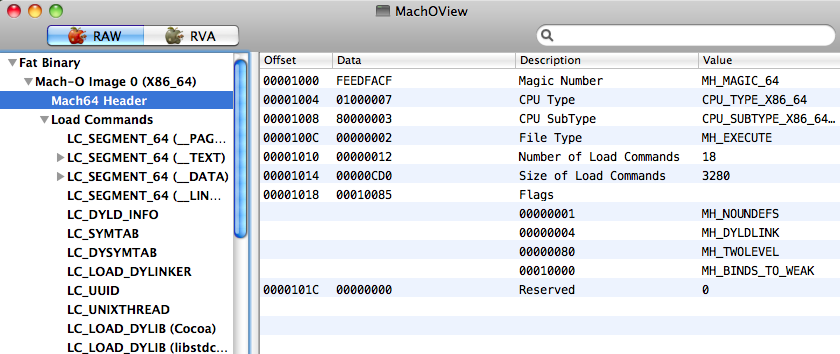
I found MachOView.app at Source Forge (here) and tried it. It gave me quite a bit of insight into the structure of our simple examples from the other day (here). The screenshot above is from a run on its own executable. There is very detailed info on the object code (or images in geek-speak).

I had been a bit worried about it since I can't find out anything about the guy (Peter Saghelyi). But I found the source, which is not under files. Do:


svn co https://machoview.svn.sourceforge.net/svnroot/machoview machoview

Wednesday, January 12, 2011

Matt Gallagher, artist


I hope you find this as entertaining as I did. A Cocoa App (with a window, even) but not using Xcode). The App itself is a curiosity---though not so much of one as Amit Singh's even shorter program (see the link for details)---but Matt Gallagher obviously knows his stuff, and I can see it serving as a harness for various simple tests.

Maybe I should make a sidebar populated with blogs like his. Check it out.

Tuesday, January 11, 2011

Build Python on OS X with clang

I've been fooling around with clang as a gcc replacement. (I'd love to have Xcode 4 but it's not worth the $99). Here we build Python 2.7 in record time:


mkdir ~/temp
cd ~/temp
curl -O http://www.python.org/ftp/python/2.7.1/Python-2.7.1.tgz
tar -zxf Python-2.7.1.tgz
mkdir Python
date


The date output:


Wed Jan 12 15:35:26 EST 2011


cd Python-2.7.1/
export CC=clang
./configure --prefix=/Users/telliott_admin/temp/Python --without-gcc
make && make install
date


Wed Jan 12 15:38:02 EST 2011


2 minutes and 36 seconds!


~/temp/Python/bin/python
Python 2.7.1 (r271:86832, Jan 12 2011, 15:36:42)
[GCC 4.2.1 Compatible Clang Compiler] on darwin
Type "help", "copyright", "credits" or "license" for more information.
>>> import sys
>>> sys.version
'2.7.1 (r271:86832, Jan 12 2011, 15:36:42) \n[GCC 4.2.1 Compatible Clang Compiler]'
[1]+ Stopped ~/temp/Python/bin/python


The time stamp is interesting..


> file ~/temp/Python/bin/python
/Users/telliott_admin/temp/Python/bin/python: Mach-O 64-bit executable x86_64


cd ..
curl -O http://python-distribute.org/distribute_setup.py
~/temp/Python/bin/python distribute_setup.py
> cd Python/bin
> ls
2to3 pydoc python2.7-config
easy_install python smtpd.py
easy_install-2.7 python-config
idle python2.7

~/temp/Python/bin/easy_install-2.7 numpy
..
ImportError: No module named numpy.distutils


just hit it again and it'll finish


~/temp/Python/bin/python
Python 2.7.1 (r271:86832, Jan 12 2011, 15:36:42)
[GCC 4.2.1 Compatible Clang Compiler] on darwin
Type "help", "copyright", "credits" or "license" for more information.
>>> from numpy import *
>>>


However, I was unable to do a framework build to this location, and I was unable to build matplotlib either, at least so far.

Sunday, January 9, 2011

Python for PyObjC

This is a short post to document that I was able to download the Python.org's Framework build of Python 2.7 and then install matplotlib in it, as well as modify a Cocoa-Python application to link against that Framework. The only thing that looks a little shaky is the PyObjC install, but it still seems like it's working. Not every detail is given, but I hope it's enough.

The installer comes from here for python-2.7.1-macosx10.6.dmg (Mac Installer disk image (2.7.1) for OS X 10.6 and later).

I did a stock install except I unchecked Shell profile updater under Custom.. Not sure why, except I didn't want to spend time figuring out what it does.

Python.org installs stuff in


/Library/Frameworks/Pythonframework
/Applications
/usr/local/bin


I added this to .bash_profile


> export PATH=/$PATH:/Library/Frameworks/Python.framework/Versions/2.7/bin


I anticipated that easy_install would be difficult, but I got (something like) it from distribute:


> curl -O http://python-distribute.org/distribute_setup.py
> /usr/local/bin/python distribute_setup.py


I couldn't find any decent docs, though. It looks like they've just copied the easy_install documentation which I found impossible to figure out so far. But, poking around, I found easy_install and easy_install-2.7 in bin:


> which easy_install-2.7
/Library/Frameworks/Python.framework/Versions/2.7/bin/easy_install-2.7


The way my $PATH is set up, easy_install runs the wrong Python. That's OK, we just do:


> easy_install-2.7 -U numpy
> easy_install-2.7 pyobjc==2.2
> easy_install-2.7 -U pip


pyobjc has lots of warnings but looks OK


> /usr/local/bin/python 
Python 2.7.1 (r271:86882M, Nov 30 2010, 10:35:34)
[GCC 4.2.1 (Apple Inc. build 5664)] on darwin
Type "help", "copyright", "credits" or "license" for more information.
>>> import numpy
>>> numpy.__version__
'1.5.1'
>>> import objc
>>> objc.__version__
'2.2'
>>> from Foundation import *
>>>
[1]+ Stopped /usr/local/bin/python


Next, I installed matplotlib using instructions from Gavin Huttley (here, here). Since matplotlib-1.0.0 is available, I went for it. In the make.osx file:


PYVERSION=2.7
PYTHON=python${PYVERSION}
ZLIBVERSION=1.2.3
PNGVERSION=1.2.39
FREETYPEVERSION=2.3.11
MACOSX_DEPLOYMENT_TARGET=10.6
OSX_SDK_VER=10.6
ARCH_FLAGS="-arch i386-arch x86_64"


I changed it to Python 2.7.

I also needed to update to libpng-1.2.39 and libfreetype-2.3.11 (although these are not the latest versions.. In fact, I had a bit of trouble with libpng since I got back a file that was really html, though titled as .gz or .bz2 or .xz. I finally found it here). For the other one:


> FREETYPEVERSION=2.3.11
> curl -O http://ftp.twaren.net/Unix/NonGNU/freetype/freetype-{$FREETYPEVERSION}.tar.bz2


As I said, the build instructions were as given at the link.

[UPDATE: Poking around in libpng file INSTALL, I notice that it says: "Before installing libpng, you must first install zlib, if it is not already on your system." So I'll do it in that order next time.]

I tested matplotlib by running the script from here.

Then, I got PyCogent (download link):


> cd PyCogent-1.5
> /usr/local/bin/python setup.py build
> sudo /usr/local/bin/python setup.py install
>>> from cogent import *
>>>
[2]+ Stopped /usr/local/bin/python


> cd tests
> /usr/local/bin/python alltests.py "$@"


I had a few failures:


Ran 3602 tests in 184.766s

FAILED (failures=12, errors=4)


Some of these are related to executables not present. Looks pretty good. Finally, let's setup a new Xcode project:

Xcode > Cocoa-Python application

change SDK to 10.6
delete Python.framework
drag in new Python.framework
under Targets > X > Link Binary ..
drag in new Python.framework


Since our Python is a universal binary with 64-bit:


> /usr/local/bin/python
Python 2.7.1 (r271:86882M, Nov 30 2010, 10:35:34)
[GCC 4.2.1 (Apple Inc. build 5664)] on darwin
Type "help", "copyright", "credits" or "license" for more information.
>>> import sys; print hex(sys.maxint)
0x7fffffffffffffff
[2]+ Stopped /usr/local/bin/python
> /usr/local/bin/python -c "import struct; print struct.calcsize('P')"
8
> /usr/local/bin/python -c "import platform; print platform.architecture()"
('64bit', '')


Build the Xcode project as 64-bit as well. Add this to main.py:


import sys
print sys.version
print hex(sys.maxint)


And run it from the Console:


2.7.1 (r271:86882M, Nov 30 2010, 10:35:34) 
[GCC 4.2.1 (Apple Inc. build 5664)]
0x7fffffffffffffff

It works!

Saturday, January 8, 2011

More hidden treasure in Python

Saw another "easter egg" for the first time this morning (here).

It was tantalizing enough that I grabbed Python 2.7 from Macports:

> sudo port install python27
> /opt/local/bin/python2.7
Python 2.7.1 (r271:86832, Jan 8 2011, 09:26:04)
[GCC 4.2.1 (Apple Inc. build 5664)] on darwin
Type "help", "copyright", "credits" or "license" for more information.
>>> import antigravity

But I don't want to spoil the secret completely.

Hidden treasure in Python

Some fun Python history on this:

> python
Python 2.6.1 (r261:67515, Jun 24 2010, 21:47:49)
[GCC 4.2.1 (Apple Inc. build 5646)] on darwin
Type "help", "copyright", "credits" or "license" for more information.
>>> import this
The Zen of Python, by Tim Peters

Beautiful is better than ugly.
Explicit is better than implicit.
Simple is better than complex.
Complex is better than complicated.
Flat is better than nested.
Sparse is better than dense.
Readability counts.
Special cases aren't special enough to break the rules.
Although practicality beats purity.
Errors should never pass silently.
Unless explicitly silenced.
In the face of ambiguity, refuse the temptation to guess.
There should be one-- and preferably only one --obvious way to do it.
Although that way may not be obvious at first unless you're Dutch.
Now is better than never.
Although never is often better than *right* now.
If the implementation is hard to explain, it's a bad idea.
If the implementation is easy to explain, it may be a good idea.
Namespaces are one honking great idea -- let's do more of those!


How was this ever found? It's not in
>>> dir(__builtins__)

Finding Python (for PyObjC) 2

One last post about PyObjC issues and finding which Python is running (under OS X) and then I'm done with it. Until I have another problem.. The structure of a framework is like this:


MyFramework.framework/
MyFramework -> Versions/Current/MyFramework
Resources -> Versions/Current/Resources
Versions/
A/
MyFramework
Headers/
MyHeader.h
Resources/
English.lproj/
InfoPlist.strings
Info.plist
Current -> A

From the docs, a framework normally has a structure like that shown above, where (if A is the current version) the actual library would be:

MyFramework.framework/Versions/A/MyFramework

The reason for the post is that I realized I've been overlooking something obvious: the existence of an Info.plist file. Just as we set the key: NSPrincipalClass, to have the value: SimpleMessage in our bundle (here), there is a key in the Python.framework:

cat Resources/Info.plist
..
<key>CFBundleExecutable</key>
<string>Python</string>

This key is not required to be set for a framework (a framework doesn't have to contain any code), but if it is, you'd expect it to be the path to the executable. Although there is something in the Framework docs about this key must be the same as the name of the framework. So the executable should be:

/System/Library/Frameworks/Python.framework/Versions/2.5/Python

As far as I can see, our best approach is still to snoop on the loader. And to solve the original problem (no PyObjC) by making sure that we're running System Python.

Friday, January 7, 2011

Finding Python (for PyObjC)

This is a post exploring how to hunt down which Python is launched when we build and run a Python Cocoa application using Xcode and the templates from here.

The problem to be solved is that in some situations, the wrong Python is run, and it doesn't have PyObjC installed, so the statement import objc fails with ImportError, and the App terminates.

In order to fix that, we need to figure out which Python is running and either (i) change which one is run, (ii) remove the "wrong" one, (iii) install PyObjC into the "wrong" one or (iv) provide a path to PyObjC. I fixed my problem before by (ii). I never got (iii) working because I haven't figured out yet how to install easy_install when it's not there yet, or alternatively build PyObjC from scratch.

What we'll see here leads to the recommendation that you try (i).

We can start our troubleshooting by inserting this code into main.py before the import of objc, as shown:

import sys
print sys.version
import objc


2.5.4 (r254:67916, Jun 24 2010, 21:47:25) 

Where does this come from? To begin with, it does not depend on this line in main.m:

Py_SetProgramName("/usr/bin/python");

The line can be commented out and everything still runs fine. I think it may be roadkill left over from the old days.

The second thing is that if we look at the Xcode build settings for either the project or the target we see:

Base SDK Mac OS X 10.5

The name or path of the base SDK being used during the build. The product will be built against the headers and libraries located inside the indicated SDK. This path will be prepended to all search paths, and will be passed through the environment to the compiler and linker. Normally, this path is set at the project level via the "Cross-Develop Using Target SDK" popup in the General tab of the project inspector. Additional SDKs can be specified in the ADDITIONAL_SDKS setting. [SDKROOT]


Since the default SDK was set for 10.5, at link time we expect to link against:

/Developer/SDKs/MacOSX10.5.sdk/System/Library/Frameworks/Python.framework

If we double-click on the Python.framework (under Frameworks > Linked Frameworks in the Xcode project) we get a Finder window open to:

/System/Library/Frameworks/Python.framework

If we do get info with the Python.framework selected we get

Name: Python.framework
Path: /System/Library/Frameworks/Python.framework


but all of this says nothing about the version so one might expect it to go with Current, which is actually Python 2.6:

/System/Library/Frameworks/Python.framework/Versions/2.6

I've looked at environment info. Put this in main.py:

import os
for k in os.environ:
print k, os.environ[k]

The only thing interesting is:

PATH /Developer/usr/bin:/usr/bin:/bin:/usr/sbin:/sbin
PYTHONPATH /Users/telliott_admin/Desktop/X/build/Debug/X.app/Contents/Resources:/Users/telliott_admin/Desktop/X/build/Debug/X.app/Contents/Resources/PyObjC
DYLD_FRAMEWORK_PATH /Users/telliott_admin/Desktop/X/build/Debug
DYLD_LIBRARY_PATH /Users/telliott_admin/Desktop/X/build/Debug
DYLD_NO_FIX_PREBINDING YES

The PATH variable is not the one from my shell. But there isn't any Python in /Developer/usr/bin and both Python and python in /usr/bin give 2.6. So that's not where it comes from. $PYTHONPATH just points to the App.

Let's try to find out more using this trick:

> export DYLD_PRINT_LIBRARIES=1
> ~/Desktop/X/build/Debug/X.app/Contents/MacOS/X
..
dyld: loaded: /System/Library/Frameworks/Python.framework/Versions/2.5/Python
..
2.5.4 (r254:67916, Jun 24 2010, 21:47:25)
[GCC 4.2.1 (Apple Inc. build 5646)]
dyld: loaded: /System/Library/Frameworks/Python.framework/Versions/2.5/Extras/lib/python/PyObjC/objc/_objc.so

We're clearly loading the 2.5 framework. And this behavior can be changed by changing the SDK in Xcode. However, I can't show you anything more right now because I no longer have a failing example! (here)

I don't see anything in any of the settings for the Project, Target or Executable that would explain which Python is actually launched when the App runs. (As you'll see in a minute, there are two choices even for the Python.framework, for example in Version 2.5).


There is some weirdness about the system framework. On three different machines running OS X 10.6.5: Python at top-level in the 2.5 framework seems to be a dynamically linked library.

But it actually runs /usr/bin/Python which is 2.6!:

> cd /System/Library/Frameworks/Python.framework/Versions/2.5
> ls -al P*
-rwxr-xr-x 1 root wheel 3702720 Nov 6 21:53 Python
> Python
Python 2.6.1 (r261:67515, Jun 24 2010, 21:47:49)
> file Python
Python: Mach-O universal binary with 3 architectures
Python (for architecture x86_64): Mach-O 64-bit dynamically linked shared library x86_64
Python (for architecture i386): Mach-O dynamically linked shared library i386
Python (for architecture ppc7400): Mach-O dynamically linked shared library ppc


The whole second half of the post, and the part just above, is a hideous mistake. See here for details.

The stupid, it burns.
link

Or as my boss likes to tell me, "some days you're the dog, and some days you're the hydrant"---he's amused, me not so much.

Terminal prompt

I got tired of the long line in the standard Terminal prompt, so I put this at the end of .bash_profile:


PS1="> " 


I used '>' just to be different. I did it with the pico editor.

I'm not sure now where I saw this. Some info here. Confirmation here. Not sure why, but export isn't necessary.

OS X Frameworks & Bundles 3

Here's my last example on Frameworks from Dalrymple & Hillegass (Advanced Mac OS X Programming). We have an incredibly useful Framework with a single class and one method:

Stuff.h

#import <Cocoa/Cocoa.h>

@interface Stuff : NSObject
{
}
+ (void) doStuff;
@end

Stuff.m

#import "Stuff.h"

@implementation Stuff

+ (void) doStuff
{
NSLog(@"doing stuff.");
}
@end

Make a new Xcode project: Cocoa Framework and drag in these two files under Classes. Build it. Select the SimpleFramework target, and then click on Stuff.h and change it to "public".


Then get the Inspector for the target (double-click on SimpleFramework under the Targets pane) and under the Build tab > Deployment > Installation Directory type @executable_path/../Frameworks. Build the framework.


Now, when this Framework is part of an Application, that App will have the Framework in a Frameworks directory that is accessible from one level above where the App lives. This path will allow the App to find the Framework. In this screenshot, we're looking at the package contents for SimpleApp (which we haven't built yet). You can see that this parent directory which holds MacOS > SimpleApp also contains a Frameworks directory and that will have our SimpleFramework.framework.


The next step is "prebinding" but I skipped that. We don't do that anymore. See here.

Now, we make a new Cocoa Application project (SimpleApp) and in main.m import the framework and add a line:

#import <Cocoa/Cocoa.h>
#import <SimpleFramework/Stuff.h>

int main(int argc, char *argv[])
{
[Stuff doStuff];
return NSApplicationMain(argc, (const char **) argv);
}

Now, we need to copy the Framework into the App. Drag the SimpleFramework.framework bundle into the Xcode Groups & Files pane of SimpleApp.


Select the SimpleApp target and bring up New Build Phase > New Copy Files Build Phase. You can see it as a new gray square underneath the target. Drag it so that it is above (rather than below) the "Link Binary" phase. And then drag the SimpleFramework.framework from Groups & Files into the Copy Files build phase. It looks like this:


Select the Copy Files build phase and double-click it. In the Inspector, choose Destination > Frameworks from the pulldown menu. Build and run the application from the Console:


There is a last step in the book which allows the headers to not be visible in the final application. And there is a lot of other good stuff there. I plan to get another copy when the new one comes out.

OS X Frameworks & Bundles 2

Last time I worked through two examples from Dalrymple & Hillegass (Advanced Mac OS X Programming) (here).

We built a Framework and then separately compiled and linked the useadd.c module against it. The Framework was later placed in ~Library/Frameworks, and the linker was able to load it at runtime.

The other one was a Cocoa Bundle compiled separately and placed in a known directory, which a second project that is a command line tool searches to find it. Since the tool doesn't have a place to stash resources, that's a little awkward.

They have 3 more examples in the chapter. One has a module called simplemessage.m (no header) that is compiled as a "bundle" (though not the same as the real bundles) and given the extension .msg. (It doesn't really matter what we use). Then, that code is loaded by a second module called bundleprinter, which uses a bunch of functions from <mach-o/dyld.h>:

$ gcc -Wall -o simplemessage.msg -bundle simplemessage.m
$ gcc -o bundleprinter bundleprinter.m


bundleprinter.m: In function ‘addressOfSymbol’:
bundleprinter.m:20: warning: ‘NSLookupSymbolInModule’ is deprecated (declared at /usr/include/mach-o/dyld.h:181)
bundleprinter.m:25: warning: ‘NSAddressOfSymbol’ is deprecated (declared at /usr/include/mach-o/dyld.h:188)
bundleprinter.m: In function ‘processPlugin’:
bundleprinter.m:35: warning: ‘NSCreateObjectFileImageFromFile’ is deprecated (declared at /usr/include/mach-o/dyld.h:145)
bundleprinter.m:43: warning: ‘NSLinkModule’ is deprecated (declared at /usr/include/mach-o/dyld.h:161)
bundleprinter.m:70: warning: ‘NSUnLinkModule’ is deprecated (declared at /usr/include/mach-o/dyld.h:169)
$ ./bundleprinter
SimpleMessage plug-in activated
SimpleMessage plug-in deactivated

message is: 'This is a simple message'


As I think you can see, this setup works, but the functions involved are all deprecated, so it seems pointless to go through it. The fourth example is an updated version of the same one which goes more smoothly. It uses functions declared in <dlfcn.h>: dlopen and dlsym. Their (simple version of the) plug-in is just this:

// cc -Wall -o simplemessage.msg -bundle simplemessage.m

#import <string.h>
#import <stdio.h>

int activate(void) {
printf("SimpleMessage plug-in activated\n");
return (1);
}

void deactivate(void) {
printf("SimpleMessage plug-in deactivated\n");
}

char *mymessage(void) {
return (strdup("This is a simple message"));
}

I did not use the -g flag to the compiler because the resulting .dSYM file interferes with the loading, later. You could remove it after the build if you wanted. The code which finds and loads the plug-in is below. And the output is:


$ ./bundleprinter-dl
SimpleMessage plug-in activated
SimpleMessage plug-in deactivated

message is: 'This is a simple message'


bundleprinter-dl.m:

// cc -g -o bundleprinter-dl bundleprinter-dl.m

#import <dirent.h>
#import <stdlib.h>
#import <stdio.h>
#import <errno.h>
#import <string.h>
#import <dlfcn.h>

typedef int (*ActivateFP) (void);
typedef void (*DeactivateFP) (void);
typedef char * (*MessageFP) (void);

char *processPlugin(const char *path) {
char *message = NULL;
void *module;
module = dlopen(path, RTLD_LAZY);
if (module == NULL) {
fprintf(stderr, "couldn't load plugin in at path %s. error is %s\n",
path, dlerror());
goto bailout;
}
ActivateFP activator;
DeactivateFP deactivator;
MessageFP messagator;
activator = dlsym(module, "activate");
deactivator = dlsym(module, "deactivate");
messagator = dlsym(module, "mymessage");

if (activator == NULL || deactivator == NULL
|| messagator == NULL) {
fprintf(stderr,
"could not find message symbol (%p %p %p)\n",
activator, deactivator, messagator);
goto bailout;
}
int result;
result = (activator)();
if (!result) { goto bailout; }
message = (messagator)();
(deactivator)();

bailout:
if (module != NULL) {
result = dlclose(module);
if (result != 0) {
fprintf(stderr,
"could not dlclose %s. Error is %s\n",
path, dlerror());
}
}
return (message);
}

int main (int argc, char *argv[]) {
DIR *directory;
struct dirent *entry;
directory = opendir(".");
if (directory == NULL) {
fprintf (stderr,
"could not open directory for plugins\n");
fprintf(stderr, "error: %d (%s)\n", errno, strerror(errno));
exit(EXIT_FAILURE);
}
while ((entry = readdir(directory)) != NULL) {
if (strstr(entry->d_name, ".msg") != NULL) {
char *message;
message = processPlugin(entry->d_name);
printf("\nmessage is: '%s'\n", message);
if (message != NULL) { free(message); }
}
}
closedir(directory);
return EXIT_SUCCESS;
}

The last example from this Chapter is one where a Framework is embedded in an application. That's for next time.

Wednesday, January 5, 2011

OS X Frameworks & Bundles 1

In this post, I have two more examples from Dalrymple & Hillegass (Advanced Mac OS X Programming), which illustrate the very simplest use of a Framework, and loading of a "plug-in" from a bundle.

Project 1:


In Xcode start a new project: Framework; I named it Adder. Drag add1.c and add2.c (from this post or the linked project files) into Classes. Write declarations of the two functions into a new file adder.h and drag that in too. I removed the unused Cocoa, Foundation and AppKit Frameworks under External Frameworks .. Build it (Release config).
Now, from the Desktop do:

$ gcc -g -o useadd -F./Adder/build/Release -framework Adder useadd.c

This is like what we've done before, except for the -F flag which tells the linker where to look for our framework now, at link time. At run time, it will look in a few standard locations, one of which is ~/Library/Frameworks. So move the Adder.framework there (from Adder/build/Release). And it works:

$ export DYLD_PRINT_LIBRARIES=1
$ ./useadd
dyld: loaded: /Users/telliott_admin/Desktop/./useadd
dyld: loaded: /Users/telliott_admin/Library/Frameworks/Adder.framework/Versions/A/Adder
dyld: loaded: /usr/lib/libSystem.B.dylib
dyld: loaded: /usr/lib/system/libmathCommon.A.dylib
f1: 1; main 2
f2: 10; main 12

$ unset DYLD_PRINT_LIBRARIES

Project 2:


This one is for a simple "Foundation tool" that loads code from a bundle at runtime. We've seen a bit of that before (here and a few other posts). It makes you appreciate the whole Framework approach, because the natural question is, once I've got it working, where do I put the bundle? You can put it in Library/Application Support or something, but it's an issue. The example also introduces the notion of a Protocol.

The code listing for 3 files is given below. The first two, BundlePrinter.h and SimpleMessage.m go into a new Xcode project: a Cocoa Bundle named SimpleMessage. Set the Principal Class for SimpleMessage: under Resources > Info.plist > Principal Class > SimpleMessage.

Next start a second new Xcode project: Command Line Tool > Foundation, named BundlePrinter. Put in BundlePrinter.m and another copy of BundlePrinter.h. Build it.

Copy SimpleMessage.bundle to BundlePrinter/build/Release.

In Xcode, run BundlePrinter from the Console:

run
[Switching to process 10570]
Running…
2011-01-05 08:46:39.511 BundlePrinter[10570:a0f] processing plug-in: SimpleMessage.bundle
2011-01-05 08:46:39.556 BundlePrinter[10570:a0f] SimpleMessage plug-in activated
2011-01-05 08:46:39.557 BundlePrinter[10570:a0f] SimpleMessage plug-in deactivated
2011-01-05 08:46:39.558 BundlePrinter[10570:a0f]
message is: 'This is a simple message'


Debugger stopped.
Program exited with status value:0.

It works!
BundlePrinter.h

@protocol BundlePrinterProtocol

+ (BOOL)activate;
+ (void)deactivate;

- (NSString *)message;

@end

SimpleMessage.m

#import <Foundation/Foundation.h>
#import "BundlePrinter.h"

@interface SimpleMessage:NSObject <BundlePrinterProtocol>
{ }
@end

@implementation SimpleMessage

+ (BOOL)activate {
NSLog(@"SimpleMessage plug-in activated");
return (YES);
}

+ (void)deactivate {
NSLog(@"SimpleMessage plug-in deactivated");
}

- (NSString *)message {
return (@"This is a simple message");
}
@end

BundlePrinter.m

#import <Foundation/Foundation.h>
#import "BundlePrinter.h"

NSString *processPlugin(NSString *path) {
NSBundle *plugin;
Class principalClass;
id pluginInstance;
NSString *message = nil;

NSLog(@"processing plug-in: %@", path);
plugin = [NSBundle bundleWithPath:path];
if (plugin == nil) {
NSLog(@"count not load plug-in at path %@",path);
goto bailout;
}

principalClass = [plugin principalClass];
if (principalClass == nil) {
NSLog(@"could not load principal class for plug-in at path %@",path);
goto bailout;
}

if (![principalClass conformsToProtocol:
@protocol(BundlePrinterProtocol)])
NSLog(@"plug-in must conform to the BundlePrinterProtocol");

if (![principalClass activate]) {
NSLog(@"could not activate class for plug-in at path %@", path);
goto bailout;
}
pluginInstance = [[principalClass alloc] init];
message = [pluginInstance message];
[pluginInstance release];
[principalClass deactivate];

bailout:

return message;
}

int main (int argc, const char * argv[]) {
NSAutoreleasePool * pool = [[NSAutoreleasePool alloc] init];
NSDirectoryEnumerator *enumerator;
NSString *path, *message;
enumerator = [[NSFileManager defaultManager] enumeratorAtPath:@"."];
while (path = [enumerator nextObject]) {
//NSLog(@"here %@", path);
if ([[path pathExtension] isEqualToString:@"bundle"]) {
message = processPlugin(path);
if (message != nil) {
//printf("\nmessage is: '%s'\n\n", [message cString]);
NSLog(@"\nmessage is: '%@'\n\n", message);
}
}
}
[pool drain];
return 0;
}


That's the first time I've ever used goto (and probably the last).

Tuesday, January 4, 2011

OS X Library basics 2

Here is a second example, of a dynamic library (adapted from a Stack Overflow answer here). The same .c files are used from the first example (here).

step 1, create libadd.dylib


$ gcc -g -Wall -c add*.c

$ file add1.o
add1.o: Mach-O 64-bit object x86_64

$ gcc -dynamiclib -current_version 1.0 add*.o -o libadd.dylib

$ file libadd.dylib
libadd.dylib: Mach-O 64-bit dynamically linked shared library x86_64

$ otool -L libadd.dylib
libadd.dylib:
libadd.dylib (compatibility version 0.0.0, current version 1.0.0)
/usr/lib/libSystem.B.dylib (compatibility version 1.0.0, current version 125.2.1)

Find out more about otool by doing

man otool | col -b > result.txt

col helps to format the output from man properly. I learned we can do this:

$ otool -tvV "libadd.a(add1.o)"
libadd.a(add1.o):
(__TEXT,__text) section
_f1:
00000000 pushl %ebp
00000001 movl %esp,%ebp
00000003 pushl %ebx
00000004 subl $0x14,%esp
00000007 calll 0x0000000c
0000000c popl %ebx
0000000d movl 0x08(%ebp),%eax
00000010 movl %eax,0x04(%esp)
00000014 leal 0x2fd-0xc(%ebx),%eax
0000001a movl %eax,(%esp)
0000001d calll _printf+0x100000000
00000022 movl 0x08(%ebp),%eax
00000025 incl %eax
00000026 addl $0x14,%esp
00000029 popl %ebx
0000002a leave
0000002b ret

I don't speak assembly, but I can get the general idea.
Step 2, create useadd


$ gcc -c useadd.c

$ gcc -v useadd.o ./libadd.dylib -o useadd
Using built-in specs.
Target: i686-apple-darwin10
Configured with: /var/tmp/gcc/gcc-5664~89/src/configure --disable-checking --enable-werror --prefix=/usr --mandir=/usr/share/man --enable-languages=c,objc,c++,obj-c++ --program-transform-name=/^[cg][^.-]*$/s/$/-4.2/ --with-slibdir=/usr/lib --build=i686-apple-darwin10 --with-gxx-include-dir=/usr/include/c++/4.2.1 --host=i686-apple-darwin10 --target=i686-apple-darwin10
Thread model: posix
gcc version 4.2.1 (Apple Inc. build 5664)
/usr/libexec/gcc/i686-apple-darwin10/4.2.1/collect2 -dynamic -arch i386 -macosx_version_min 10.6.5 -weak_reference_mismatches non-weak -o useadd -lcrt1.10.6.o -L/usr/lib/i686-apple-darwin10/4.2.1 -L/usr/lib/gcc/i686-apple-darwin10/4.2.1 -L/usr/lib/gcc/i686-apple-darwin10/4.2.1 -L/usr/lib/gcc/i686-apple-darwin10/4.2.1/../../../i686-apple-darwin10/4.2.1 -L/usr/lib/gcc/i686-apple-darwin10/4.2.1/../../.. useadd.o ./libadd.dylib -lSystem -lgcc -lSystem

$ nm -gpv useadd
0000202c D _NXArgc
00002030 D _NXArgv
00002038 D ___progname
00001000 A __mh_execute_header
00002034 D _environ
00001f02 T _main
00001ec4 T start
U _exit
U _f1
U _f2
U _printf
U dyld_stub_binder

$ ./useadd
f1: 1; main 2
f2: 10; main 12

Step 3. Use an environment variable to give output when libraries are loaded:

$ export DYLD_PRINT_LIBRARIES=1

$ ./useadd
dyld: loaded: /Users/telliott_admin/Desktop/add/./useadd
dyld: loaded: /Users/telliott_admin/Desktop/add/libadd.dylib
dyld: loaded: /usr/lib/libSystem.B.dylib
dyld: loaded: /usr/lib/system/libmathCommon.A.dylib
f1: 1; main 2
f2: 10; main 12

$ mv libadd.dylib /tmp
dyld: loaded: /bin/mv
dyld: loaded: /usr/lib/libSystem.B.dylib
dyld: loaded: /usr/lib/system/libmathCommon.A.dylib

$ export DYLD_LIBRARY_PATH=/tmp

$ ./useadd
dyld: loaded: /Users/telliott_admin/Desktop/add/./useadd
dyld: loaded: /tmp/libadd.dylib
dyld: loaded: /usr/lib/libSystem.B.dylib
dyld: loaded: /usr/lib/system/libmathCommon.A.dylib
f1: 1; main 2
f2: 10; main 12

$ unset DYLD_LIBRARY_PATH

Notice in the second run of ./useadd, we loaded /tmp/libadd.dylib.
Finally, let's snoop on Python:

$ python
dyld: loaded: /usr/bin/python
dyld: loaded: /System/Library/Frameworks/CoreFoundation.framework/Versions/A/CoreFoundation
dyld: loaded: /usr/lib/libSystem.B.dylib
dyld: loaded: /usr/lib/libauto.dylib
dyld: loaded: /usr/lib/libicucore.A.dylib
dyld: loaded: /usr/lib/libobjc.A.dylib
dyld: loaded: /usr/lib/libz.1.dylib
dyld: loaded: /usr/lib/libstdc++.6.dylib
dyld: loaded: /usr/lib/system/libmathCommon.A.dylib
dyld: loaded: /System/Library/Frameworks/Python.framework/Versions/2.6/Resources/Python.app/Contents/MacOS/Python
dyld: loaded: /System/Library/Frameworks/Python.framework/Versions/2.6/Python
dyld: loaded: /usr/lib/libSystem.B.dylib
dyld: loaded: /System/Library/Frameworks/CoreFoundation.framework/Versions/A/CoreFoundation
dyld: loaded: /usr/lib/libauto.dylib
dyld: loaded: /usr/lib/libicucore.A.dylib
dyld: loaded: /usr/lib/libobjc.A.dylib
dyld: loaded: /usr/lib/libz.1.dylib
dyld: loaded: /usr/lib/libstdc++.6.dylib
dyld: loaded: /usr/lib/system/libmathCommon.A.dylib
Python 2.6.1 (r261:67515, Jun 24 2010, 21:47:49)
[GCC 4.2.1 (Apple Inc. build 5646)] on darwin
Type "help", "copyright", "credits" or "license" for more information.
dyld: loaded: /System/Library/Frameworks/Python.framework/Versions/2.6/lib/python2.6/lib-dynload/readline.so
dyld: loaded: /usr/lib/libedit.2.dylib
dyld: loaded: /usr/lib/libncurses.5.4.dylib
>>> import string
dyld: loaded: /System/Library/Frameworks/Python.framework/Versions/2.6/lib/python2.6/lib-dynload/strop.so
>>> import sys
>>> import math
dyld: loaded: /System/Library/Frameworks/Python.framework/Versions/2.6/lib/python2.6/lib-dynload/math.so
>>>
[1]+ Stopped python

$ unset DYLD_PRINT_LIBRARIES

We can see that some .so libraries can be loaded. However, there are some fundamental differences between the Unix method of shared object .so libraries and the OS X / Mach model of bundles and frameworks.
That's for the future!

OS X Library basics

This is an elementary post about libraries on OS X. As in other areas, I'm just getting started with this, so if you spot an error, please let me know. The primary purpose is to orient myself to help in troubleshooting when a software install at the command line runs into a problem.

If we have our code split up into a bunch of different files, compiled separately, we can link them into a single executable as discussed in a previous post (here), which uses the make tool.

It also useful to define libraries that may contain a number of different modules which are already pre-compiled and linked. A primary distinction is between static libraries, which are copied into the target application, and dynamic libraries which are not.

We'll start with the static version in this post. The example is adapted from Dalrymple & Hillegass (Advanced Mac OS X Programming) which is still a valuable resource even though it's a bit dated. It looks like there may be a new edition later this year. Here is a simple file add1.c with a nice function:

#include <stdio.h>

int f1(int x)
{
printf( "f1: %d;", x );
return x+1;
}

A similar function f2 is defined in add2.c We do the following:

gcc -g -Wall -c add*.c

(-g adds debugging symbols, -Wall shows all warnings). The result is familiar: two object files add1.o and add2.o.

These functions are used by your program, defined in useadd.c:

#include <stdio.h>
extern int f1(int x);
extern int f2(int x);

int main(int argc, char** argv){
printf("  main %d\n", f1(1));
printf("  main %d\n", f2(10));
return 0;
}

Rather than referring to a header file for the definitions of f1 and f2, we make a declaration of extern. Now the book says to do:

ar crl libadd.a add*.o
gcc -g -Wall -o useadd useadd.c -L. -ladd

with the flags to ar:

c create if needed
r replace / add
l next token is name of file to generate

and flags passed through gcc to ld are a search path and file description as described here.

It works:

$ ./useadd
f1: 1;  main 2
f2: 10;  main 12


The ar tool is Unix archive utility, which has for the most part been superseded by tar. Here is what the output file looks like for a run of ar on two simple text files. I think you can guess what they contain:

!<arch>
file1.txt       1294193315  501   20    100644  9         `
my data1

file2.txt       1294193320  501   20    100644  9         `
my data2

Now, Apple suggests that you use libtool:

libtool -static add*.o -o libadd.a

[UPDATE: The docs (here) say that everything must be compiled as well as linked with -static for this to work]

Also, for this example, you don't need the search paths, but could just do:

$ gcc -g -Wall -o useadd useadd.c libadd.a


It's important to list the library after useadd.c, otherwise the linker will discard the library symbols as unneeded. We can explore the symbols defined in our library (or any object file for that matter):

$ nm libadd.a 

libadd.a(add1.o):
00000000 T _f1
U _printf

libadd.a(add2.o):
00000000 T _f2
U _printf

The function names are preceded by an underscore. The U means that printf is as yet undefined, and the T stands for (Text)---not sure what that refers to.

$ gcc -g -Wall -c useadd.c
$ nm useadd.o
U _f1
U _f2
00000000 T _main
U _printf

Here we see that in useadd.o the functions f1 and f2 are as yet undefined. Another very interesting thing is to set the environment variable:

$ export DYLD_PRINT_LIBRARIES=1
$ ./useadd
dyld: loaded: /Users/telliott_admin/Desktop/add/./useadd
dyld: loaded: /usr/lib/libSystem.B.dylib
dyld: loaded: /usr/lib/system/libmathCommon.A.dylib
f1: 1;  main 2
f2: 10;  main 12

We can watch as the libraries are loaded. There are a bunch of other things here.

Sunday, January 2, 2011

simple C example 4: file read

This post describes basic use of fscanf to read data in from a file. A detailed manual page about the function is here.

The usual approach is that we must first pre-allocate storage of the appropriate type for the data we expect (at least, if we wish to save it for further manipulation). So far I've used char, int and double data.

A difficulty is that we usually don't know how much data we will read from the file. For the sites program (here), when we read scores or counts, the file contains an integer as the first value and that specifies how much data is present. But in general we don't know, so we'll have to allocate storage as we go.

fscanf takes a pointer to the storage as an argument. We can either do this directly, or pass the address of a variable of the correct type. There are lots of options for fscanf, including the ability to read data in larger chunks, to read data of different types (in a specified order), or to skip certain characters, but I'm not going to worry about those complications here.

In the first example, we don't save the data, just read it and echo to stdout. The file 'lorem.txt' is the default source, but an alternate can be specified on the command line.

example1.c:

#include <stdio.h>
#include <stdlib.h>

int main(int argc, const char* argv[]) {
const char *ifn;
if (argc > 1) { ifn = argv[1]; }
else { ifn = "lorem.txt"; }
FILE *ifp = fopen(ifn,"r");
if (ifp == NULL) {
printf("open file failed with: %s\n", ifn);
exit(EXIT_FAILURE);
}
char c;
int result;
result = fscanf(ifp,"%c",&c);
if (result == -1) {
printf("file read failed with: %s\n", ifn);
exit(EXIT_FAILURE);
}
int count = 0;
while (result != -1) {
if ((count > 40) && (c==' ')) {
printf("\n");
count = 0;
}
else {
printf("%c", c);
count++;
}
result = fscanf(ifp,"%c",&c);
}
printf("\n");
return 0;
}

output:

$ gcc example1.c -o test
$ ./test
Lorem ipsum dolor sit amet, consectetur adipisicing
elit, sed do eiusmod tempor incididunt ut
labore et dolore magna aliqua. Ut enim ad
minim veniam, quis nostrud exercitation ullamco
laboris nisi ut aliquip ex ea commodo consequat.
Duis aute irure dolor in reprehenderit in
voluptate velit esse cillum dolore eu fugiat
nulla pariatur. Excepteur sint occaecat cupidatat
non proident, sunt in culpa qui officia deserunt
mollit anim id est laborum.

We read integers (or floats) by appropriate changes to the arguments to fscanf:

    int value;
int result;
result = fscanf(ifp,"%d",&value);


In the third example, we're reading the DNA sequence of E. coli (more than 4 million nucleotides). A rather crude approach is to just allocate an array of sufficient size (N = 5000000 works). A more flexible and less wasteful implementation would appropriately scale up the memory usage as needed. We substitute the following for the second half of the code above (starting at int count = 0;), reading just the first 240 nt:


    int N = 240;
char *buffer = (char *) malloc (N+1);
if (buffer == NULL) {
printf("not enough memory\n");
exit(EXIT_FAILURE);
}
int i=0;
char *p = buffer;
*p = c;
while ((result != -1) && (i < N)) {
p++;
i++;
result = fscanf(ifp,"%c", p);
}
int count = i;
for (i=0; i < count; i++) {
if ((i) && (!(i%60))) {
printf("\n");
}
printf("%c", buffer[i]);
}
printf("\n");
return 0;
}

Output:

$ gcc example3.c -o test
$ ./test ECsequence.txt
agcttttcattctgactgcaacgggcaatatgtctctgtgtggattaaaaaaagagtgtc
tgatagcagcttctgaactggttacctgccgtgagtaaattaaaattttattgacttagg
tcactaaatactttaaccaatataggcatagcgcacagacagataaaaattacagagtac
acaacatccatgaaacgcattagcaccaccattaccaccaccatcaccattaccacaggt

Of course, the appropriate source file must exist for this to work.

Zipped project files on Dropbox (here)

simple C example 3: structs

Here's a simple struct example, containing two elements, a char * and an int. We typedef it to be an "A" and then construct one in four different ways: (i) in main, (ii) by calling an auxiliary function, (iii) by assigning the address of the A from (i), and by using malloc in an auxialiary function.

The syntax for access to the member elements is different in the case of a pointer to the struct variable and a struct variable itself.

As you can see from the output, all four approaches give valid A's but the last one has a quite different address. It is on the "heap" rather than on the "stack."

One thing I don't understand is whether examples 2 and 4 are dangerous. Under what circumstances do objects that we obtain from a function go away when those functions return? If you know, I'd be grateful for your insight. [UPDATE: I'm pretty sure example 2 is not something you should do, because after the function returns that memory will be reallocated. I guess we got away with it here because no further allocations were made.]

Output:

I'm an A:  A 1 0x7fff5fbff9b0
me too : A 2 0x7fff5fbff9a0
me three: A 1 0x7fff5fbff9b0
me four : A 3 0x100100080

Code listing:

#include <stdio.h>
#include <stdlib.h>

struct myStruct {
char *s;
int x;
};

typedef struct myStruct A;
A stack_A(char *, int);
A * heap_A(char *, int);

// bad bad bad
A stack_A(char *s, int x) {
A a;
a.x = x;
a.s = s;
return a;
}

A * heap_A(char *s, int x) {
A * p = (A *) malloc(sizeof(A));
p->x = x;
p->s = s;
return p;
}


int main() {
A a1;
a1.x = 1;
a1.s = "A\0";
printf("I'm an A: %s %d %p\n", a1.s, a1.x, &a1);

A a2 = stack_A("A\0",2);
printf("me too : %s %d %p\n", a2.s, a2.x, &a2);

A *p = &a1;
printf("me three: %s %d %p\n", p->s, p->x, p);

A *p2 = heap_A("A\0",3);
printf("me four : %s %d %p\n", p2->s, p2->x, p2);
return 0;
}

DNA binding sites 7

Continuing in the same vein as a number of recent posts (some links here), the Dropbox link below leads to my version of a site analysis program written in C. It's not very user friendly, for example, paths to the input files are hard-coded. A substantial part of the effort required went into ScoreList.c, which implements a function for constructing a list of scores from a list of nucleotide counts for each position, and a second function which reads such a score list in from disk.

The logic of the program was explained in the previous post. I won't spend much time explaining the details here.

Let's just say that if this blog has a motto it is: "learn by doing."

So... get in there and try writing your own version. If you get stuck, you can see how (or if) I handled the problem.

A few other notes: I tested the program by using a list of counts for crp sites obtained as described (here). The output shows the position, score and sequence of crp sites in the E. coli genome. The first few (threshold = 12) are:


$ ./test
18968 14.33 tattgtgaactatcgcaaagaa
42067 19.16 ttctgtgattggtatcacattt
42187 12.44 attggtgatccataaaacaata
49633 14.48 aagagtgacgtaaatcacactt
70157 15.02 aagtgtgacgccgtgcaaataa
141283 18.95 atgtgtgatcgtcatcacaatt
141663 12.43 tgatgtgaaaatcctcaaagat
184120 13.67 aattgtgcttattttagcattt
223495 13.60 ggatgtgaatcacttcacacaa
243785 12.34 atttctgacgttagtcatattt
268498 13.40 taatgtgaacatgatcaacgaa
281362 18.40 atatgtgatccagcttaaattt
304272 12.45 tgttgttattcactacacgttt
312539 17.25 ttttttgacatgtatcacaaat
365617 14.65 atgagtgagctaactcacatta
..

After implementing the algorithm (which handles the sequence one character at a time) I realized that it would be good to have the site sequence available at the time of printing (as shown above). This required remembering the current site's sequence, which I grafted onto the program at the very end. Luckily it didn't change the running time by much. I think now that while the circular linked list seemed like an elegant approach, it caused as many problems as it solved, and I probably wouldn't do it again.

You can tell just from looking at the patterns that we are getting good matches to the crp consensus [T/A]3TGTGAN6TCACA[T/A]3. Also, the last site is the lac 1 (lacZ) site---reversed. So I think it's working OK.

Finally, it runs in less than 2 seconds! That's a huge improvement on the previous time. Zipped files on Dropbox (here).

DNA binding sites 6

A few weeks ago I had some posts about finding binding sites in DNA using a simple PSSM (position specific scoring matrix; last post here). The time required to evaluate all the potential sites in a bacterial genome of ≈ 5 million bp is prohibitively long (> 1 min on my machines), so I wanted to explore ways to do it faster. I started looking at Cython (here), but then realized that I need to brush up my C skills first (here).

I also had an idea that I thought at first would make the code faster, though probably it doesn't. Then I thought it would make the code clearer, though I realized after actual implementation that it doesn't do that either. What it does do is make our pass through the sequence simpler in logical terms, and it's the basis of my C-program to evaluate sites or motifs in a DNA sequence. We construct a circularly linked list, as illustrated schematically in the graphic. Each item (node) in the list holds the current value for an accumulating score that will become the score for an individual site in the sequence.


Probably it's best to illustrate with an example. Let's say we have a scoring system used to evaluate potential sites. For example, a site with a in position 1 (we'll use 1-based indexing here) contributes score a1, c in position 2 adds c2, etc.

Suppose we're looking for sites of length N = 4, and we have this sequence: acgtg. We construct a list like the following (shown here in rows to make the layout simple). After the initial priming, we end up with this:

-> 1
2 g1
3 c1 g2
4 a1 c2 g3

I set up a toy example with scores of
0.01 .. 0.04 for a1 .. a4; 0.11 to 0.14 for c1 .. c4, etc.
Output from the priming phase looks like this:

nt = a
item = 4 before: 0.00, add: 0.01 after: 0.01
nt = c
item = 3 before: 0.00, add: 0.11 after: 0.11
item = 4 before: 0.01, add: 0.12 after: 0.13
nt = g
item = 2 before: 0.00, add: 0.21 after: 0.21
item = 3 before: 0.11, add: 0.22 after: 0.33
item = 4 before: 0.13, add: 0.23 after: 0.36
1 0.000000
2 0.210000
3 0.330000
4 0.360000
end priming

Now we consider the next nucleotide in the sequence: t. We add the appropriate scores for t to each item in the list, then read the score for the item that contains a total of N scores, and finally, zero that item. The score we read is the score for the site that has sequence acgt. Schematically:

t

1 t1
2 g1 t2
3 c1 g2 t3
-> 4 a1 c2 g3 t4

1 t1
2 g1 t2
3 c1 g2 t3
-> 4

Output looks like this:

t
item = 1 before: 0.00 add: 0.31 after: 0.31
item = 2 before: 0.21 add: 0.32 after: 0.53
item = 3 before: 0.33 add: 0.33 after: 0.66
item = 4 before: 0.36 add: 0.34 after: 0.70
zeroing item = 4 final score = 0.70

The next nucleotide is g:

g

1 t1 g2
2 g1 t2 g3
-> 3 c1 g2 t3 g4
4 g1

1 t1 g2
2 g1 t2 g3
-> 3
4 g1


g
item = 4 before: 0.00 add: 0.21 after: 0.21
item = 1 before: 0.31 add: 0.22 after: 0.53
item = 2 before: 0.53 add: 0.23 after: 0.76
item = 3 before: 0.66 add: 0.24 after: 0.90
zeroing item = 3 final score = 0.90


The site acgt has score:
a1 + c2 + g3 + t4 = 0.01 + 0.12 + 0.23 + 0.34 = 0.70


The site cgtg has score:
c1 + g2 + t3 + g4 = 0.11 + 0.22 + 0.33 + 0.24 = 0.90

Zipped files on Dropbox (here). These will change in the next few days as I debug and test the project more...

The C code for the linked list looks like this:

item *make_circular_linked_list(int N) {
int i;
item *current, *first, *previous;
for (i=0; i<N; i++) {
current = (item *) malloc(sizeof(item));
current->num = i+1;
current->score = 0;
if (i==0) { first = current; }
else { previous->next = current; }
previous = current;
}
current->next = first;
return first;
}